Use this technical SEO checklist to uncover hidden barriers before they weaken your hard work. Modern websites need clean architecture, fast delivery, accurate signals, and reliable tracking. Not later. Now. They also need clear entity information, because discovery now happens across search engines and AI-generated answers.
Speed may be a ranking factor, but technical strength goes further. It protects crawl access, indexing, measurement, and user journeys. The goal is practical: identify what blocks crawlers, fix what slows people, and track what changes. This is the ultimate technical SEO checklist to help teams build measurable progress with confidence.
The Role of Technical SEO for Search Engines and AI Search
Technical SEO focuses on access, clarity, performance, and trust. A search engine must discover a page, understand its purpose, render the content, and decide whether it deserves visibility. AI systems add another layer. They depend on crawl access, structured context, consistent entities, and clean HTML before they can use content confidently. That means technical SEO services ensures your pages are not only published, but usable. Strong foundations help search engines crawl, support search engine rankings, and protect visibility inside evolving search results, while reducing wasted effort across wider SEO strategies and long-term technical planning cycles ahead.
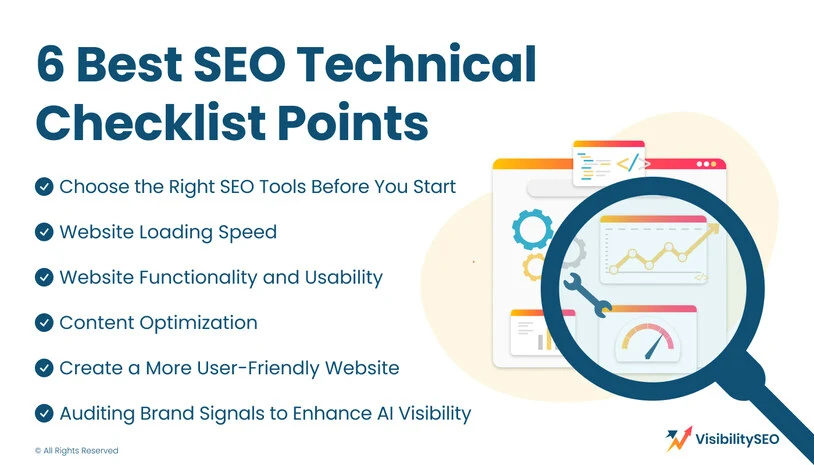
6 Best SEO Technical Checklist Points
A complete technical SEO checklist covering crawlability, speed, structure, content signals, usability, and brand clarity gives your team a practical path. It turns scattered technical checks into a controlled technical audit with priorities that support SEO success.
1. Choose the Right SEO Tools Before You Start
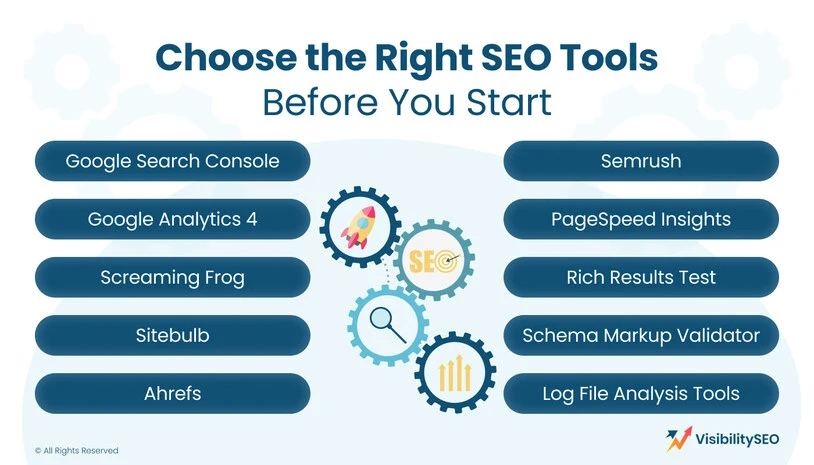
Tools shape the quality of every audit. Before checking pages, redirects, files, code, or performance data, define what each platform should reveal. One SEO audit tool may show crawl issues, another may expose visibility trends, while another explains speed. The right setup reduces guesswork. It also helps teams compare SEO metrics, track progress, and fix technical problems according to impact, not noise or convenience.
- Google Search Console: shows index coverage, crawl warnings, page experience data, sitemap status, and performance trends. It is essential for seeing how Google’s systems interpret your website, not just how your team believes it works.
- Google Analytics 4: connects technical findings to behaviour. Traffic, engagement, conversions, landing pages, and device data reveal whether changes improve real visits, not just audit scores. It gives SEO information that supports better decisions.
- Screaming Frog: lets you run a technical crawl across pages, titles, status codes, canonicals, directives, metadata, and internal link patterns. It is powerful for detecting broken paths, duplicate signals, and important technical problems at scale.
- Sitebulb: turns crawl data into visual explanations, making complex SEO aspects easier to understand. It highlights architecture, links, status codes, duplicate content, and technical elements so teams can prioritise issues without losing context.
- Ahrefs: supports backlink checks, organic visibility review, competing pages, SEO content gaps, and site health reports. It helps connect important SEO opportunities with technical findings, especially when authority and discoverability need deeper analysis.
- Semrush: combines auditing, visibility tracking, keyword monitoring, and competitor research. It can support technical SEO strategies by identifying crawlability concerns, Core Web Vitals issues, HTTPS problems, structured data errors, and wider performance patterns.
- PageSpeed Insights: reviews loading behaviour, lab data, field data, and Core Web Vitals. It helps teams understand why pages feel slow and which performance issues affect both visitors and search visibility.
- Rich Results Test: checks whether structured data is eligible for enhanced display. It confirms whether schema is valid, readable, and connected to content that can appear more clearly inside Google’s search features.
- Schema Markup Validator: reviews structured data beyond rich-result eligibility. It helps confirm that technical elements are correctly written, nested, and understandable, supporting clearer context for users and search engines.
- Log File Analysis Tools: reveal what a crawler actually requests. They show crawl waste, blocked sections, repeated hits, status problems, and whether important URLs receive enough attention from search engine crawlers.
2. Website Loading Speed
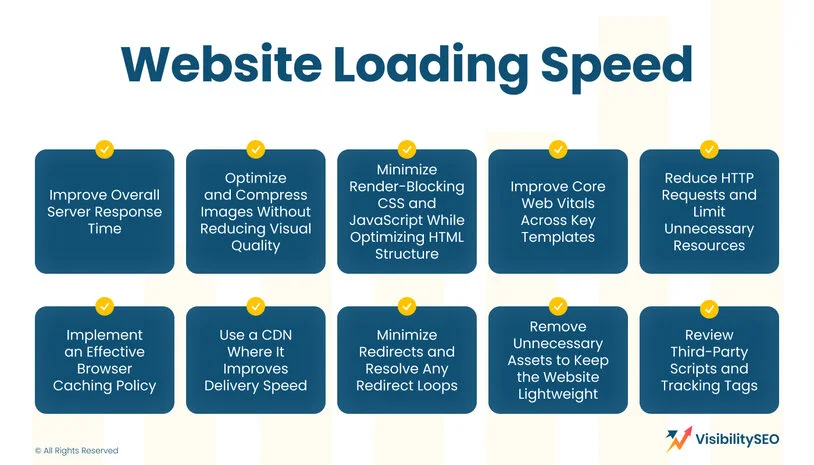
Website loading speed shapes how people and crawlers experience a page. When it feels slow, visitors lose patience and crawl resources get wasted. The technical foundation also becomes weaker, because every campaign depends on pages that open without friction. Speed is not one setting. It comes from the way the whole site delivers each page. Effective technical SEO starts with real performance data, then fixes the biggest delays first.
Improve Overall Server Response Time
Server response time is the first wait before a page can begin to load. If the server is slow, every other optimisation starts late. Review hosting quality, database performance, caching, application logic, and traffic spikes. Shared hosting may be enough for small websites, but growing businesses often need stronger resources. A faster response helps users, supports crawlers, and improves the site’s technical health from the first request.
Optimize and Compress Images Without Reducing Visual Quality
Images often carry more weight than the page itself. Compress them, resize them, remove unnecessary metadata, and serve modern formats where browser support is suitable. Keep quality high, but stop uploading oversized visuals for small display areas. Product pages, blogs, banners, and galleries need separate rules. This is important technical work because image bloat can damage largest contentful paint, bandwidth, and mobile performance very quickly.
Minimize Render-Blocking CSS and JavaScript While Optimizing HTML Structure
Render-blocking files delay what visitors see first. Review CSS, JavaScript, and HTML structure to identify code that can be deferred, reduced, split, or loaded later. Critical content should not wait behind unnecessary scripts. Good technical optimisation keeps essential design intact while removing friction from the rendering path. Test carefully. A clean score means little if functionality breaks, forms fail, or tracking disappears from key templates.
Improve Core Web Vitals Across Key Templates
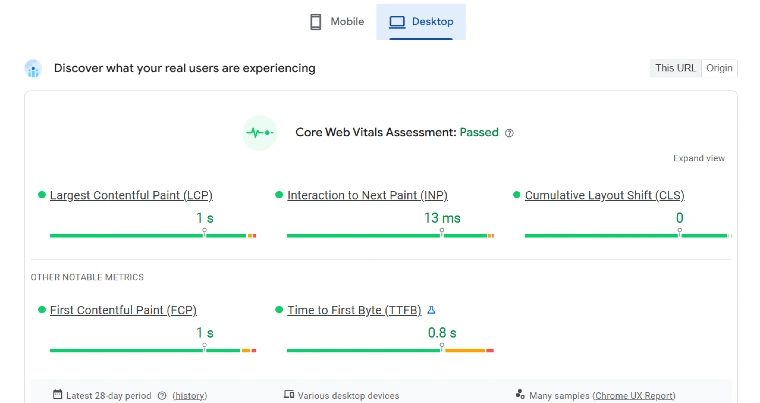
Core Web Vitals measure loading performance. They also show how quickly a page responds and whether the layout stays stable while people use it. Review first and largest contentful paint (FCP and LCP). Then check interaction to next paint and cumulative layout shift (CLS) across page templates, not only the homepage. A category page will not behave like a service page. A blog post can also feel different from a product page.
Reduce HTTP Requests and Limit Unnecessary Resources
Every file request adds another small delay. Fonts, scripts, images, icons, plugins, embeds, and tracking pixels can accumulate until the page becomes heavy. Review what loads, where it loads, and whether it serves a clear purpose. Combine or remove resources where safe. Reduce duplicate libraries. Keep important features, but remove decorative excess that weakens speed, crawl efficiency, and user confidence across important pages.
Implement an Effective Browser Caching Policy
Browser caching helps returning visitors load repeat resources faster. Set sensible rules for images, CSS, JavaScript, fonts, and static assets, then test changes in private browsing and normal browsing. Caching can hide updates if unmanaged, so create a process for clearing or versioning files after releases. Strong caching supports faster repeat visits, improves perceived performance, and reduces unnecessary server strain during busy periods.
Use a CDN Where It Improves Delivery Speed
A CDN should make distance feel smaller. Not just exist. It brings website files closer to visitors and helps pages open faster in the places where people actually use them. That matters for regional growth or large content-heavy websites. Configuration still matters. Poor settings can create cache conflicts or serve outdated files. Use a CDN only when the improvement is clear. Faster delivery. Smoother journeys. Stronger real-world performance for every visit.
Minimize Redirects and Resolve Any Redirect Loops
Redirects are useful when pages move, products change, or old content is consolidated. Too many redirects, however, create delay and confusion. Audit chains, loops, temporary redirects, mixed protocol paths, and outdated migration rules. A single clean 301 redirect is usually stronger than a long path. Redirect loops must be fixed quickly, because they can block visitors, waste crawl activity, and damage trust in the website.
Remove Unnecessary Assets to Keep the Website Lightweight
Websites collect clutter over time. Old plugins, unused scripts, abandoned landing pages, outdated images, trial widgets, and legacy files often remain long after campaigns finish. Remove what no longer supports the business. Keep backups, document changes, and test safely before deleting. A lighter website is easier to maintain, faster to load, and simpler for developers to improve when new technical SEO work begins.
Review Third-Party Scripts and Tracking Tags
Third-party scripts can slow pages, shift layouts, interrupt forms, or conflict with consent settings. Review analytics tags, chat tools, heatmaps, advertising pixels, social embeds, and testing software. Keep what proves value. Remove what no one uses. Delayed loading may help, but only when measurement remains accurate. A strong technical approach balances insight with performance, so tracking supports decisions without damaging the visitor experience.
3. Website Functionality and Usability
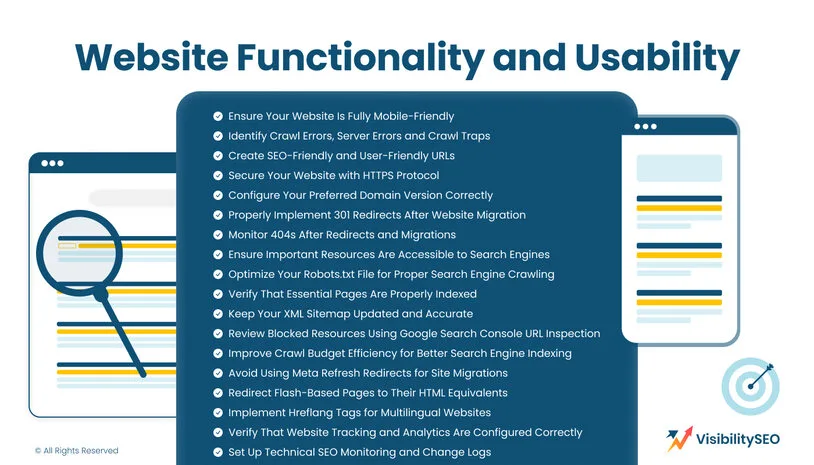
Technical SEO refers to the systems behind a page before anyone sees it. The page must load. It must be easy to crawl. It must render properly and reach the index without confusion. Functionality and usability turn that work into something people can use. Strong content still fails when mobile layouts break or redirects misfire. This section covers the technical elements of your website that help search engines understand each page.
Ensure Your Website Is Fully Mobile-Friendly

Most visitors now expect smooth browsing on mobile devices. Responsive design, readable text, tap-friendly buttons, fast templates, and stable layouts are essential. Test menus, filters, forms, checkout steps, sticky elements, and popups on real screens, not only desktop previews. Mobile usability supports users and search engines because both need clean access to the same content. Small layout issues can quickly become conversion barriers.
Identify Crawl Errors, Server Errors and Crawl Traps
Crawl errors show where discovery breaks. Server errors matter because they stop access before content can be evaluated. Blocked pages can hide important sections. Filter paths can send crawlers into crawl traps. Redirect chains slow the journey. Pagination can also break the route. A crawler should move through your site logically, not circle through low-value paths. Review errors often and document fixes so the same technical issue does not return.
Create SEO-Friendly and User-Friendly URLs
Clean URLs should feel obvious before anyone clicks. They need to describe the page in plain language, without dates that age quickly or parameters that confuse the path. Avoid changing URLs without a clear reason, because every change creates redirect work and risk. Good URL structure supports on-page SEO by making navigation easier and tracking more reliable. It also reduces confusion when future migrations happen across important pages.
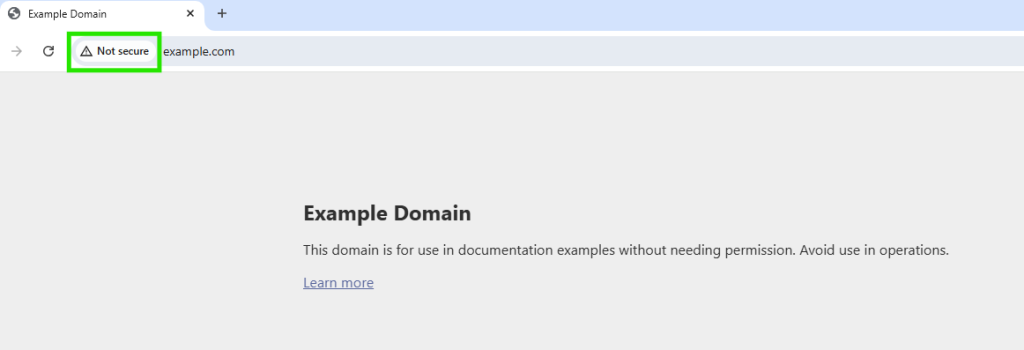
Secure Your Website with HTTPS Protocol
HTTPS protects data moving between a browser and website. It is especially important for forms, accounts, payments, and any page where visitors share information. Check SSL certificates, mixed content, canonical versions, redirects, and internal references after implementation. Security is also a trust signal. A secure protocol will not fix weak content, but an insecure experience can undermine confidence before users engage seriously.
Configure Your Preferred Domain Version Correctly
Your website should resolve consistently to one preferred version. Choose whether the live domain uses www or non-www, HTTP or HTTPS, trailing slash or no trailing slash, then enforce that version across canonicals, redirects, sitemap entries, internal links, and analytics settings. Mixed versions create duplicate signals. Clear configuration keeps authority consolidated and helps search engines understand which version should represent each page.
Properly Implement 301 Redirects After Website Migration
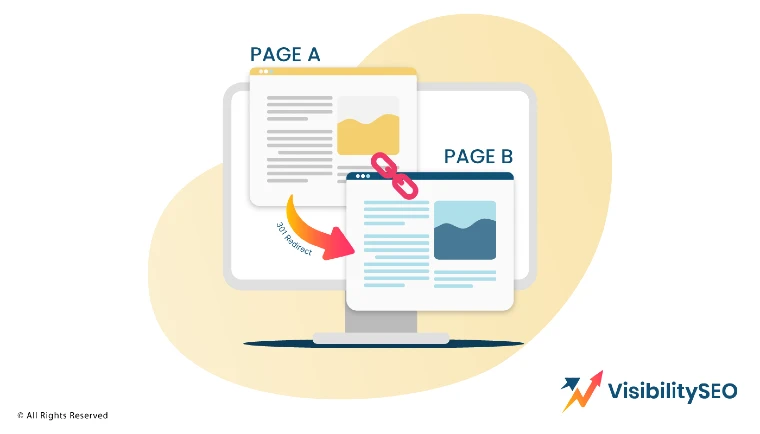
Migrations are risky because too much can change at the same time. The structure changes. Design shifts. Content moves. URLs change. Templates behave differently. Tracking can break. Map every important old URL to the most relevant new destination before launch. Avoid sending everything to the homepage. Test staging rules carefully. Launch with control. Monitor errors immediately afterwards. Proper 301 implementation protects equity and keeps user journeys intact.
Monitor 404s After Redirects and Migrations
404 pages are not always a problem. Sometimes removed content should stay removed when there is no useful replacement. The risk starts when valuable pages disappear after redirects and migrations. A backlink may point nowhere. A campaign may lose its landing page. Internal links can also send users into dead ends. Monitor 404 reports after major changes, then redirect only where the original intent still makes sense.
Ensure Important Resources Are Accessible to Search Engines
Search engines need more than the visible page. They need access to the resources that make the page load, render, and make sense. HTML must be readable. CSS should not be blocked. JavaScript needs to work without hiding key content. Images and structured data also matter. Review robots rules and server responses carefully, so important content stays accessible when modern systems crawl the website.
Optimize Your Robots.txt File for Proper Search Engine Crawling
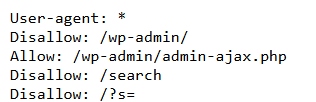
Robots.txt gives instructions about which areas crawlers may request. It should block low-value paths without hiding essential pages, scripts, images, or style files. Review disallow rules, sitemap references, staging leftovers, parameter traps, and AI crawler instructions. The file is powerful, but not a substitute for noindex directives or access control. Mistakes can quietly remove important sections from discovery.
Verify That Essential Pages Are Properly Indexed
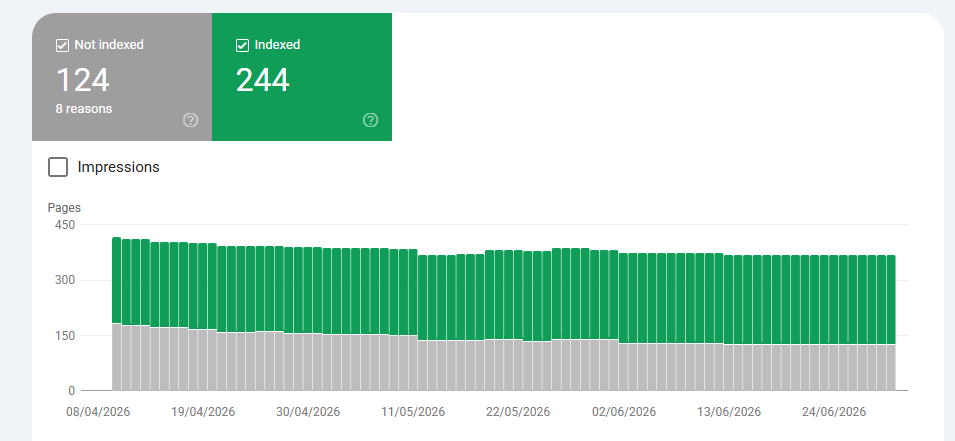
Index status shows whether important pages are eligible to appear. Check key services, categories, products, blogs, locations, and conversion pages. Investigate excluded, crawled-not-indexed, discovered-not-indexed, duplicate, canonicalised, and soft 404 reports. Some exclusions are intentional. Others reveal weak content, blocked access, duplication, or poor internal linking. Verification matters because published content has no search value if it never enters the index.
Keep Your XML Sitemap Updated and Accurate
An XML sitemap should list clean, canonical, indexable pages that deserve discovery. Remove redirected, blocked, duplicate, thin, parameterised, and broken URLs. Include recent updates when freshness matters. Submit the sitemap through webmaster platforms and reference it in robots.txt. A sitemap does not guarantee indexing, but it gives clear guidance. Accurate files help search engines understand what the business considers important.
Review Blocked Resources Using Google Search Console URL Inspection
Fetch and inspection tools show how Google’s systems access, render, and interpret pages. Use them to review blocked resources, unusual JavaScript behaviour, missing content, and differences between rendered HTML and source code. Legacy setups can hide content behind outdated patterns. Testing individual examples is useful, but patterns matter more. When one template fails, many pages may share the problem.
Improve Crawl Budget Efficiency for Better Search Engine Indexing
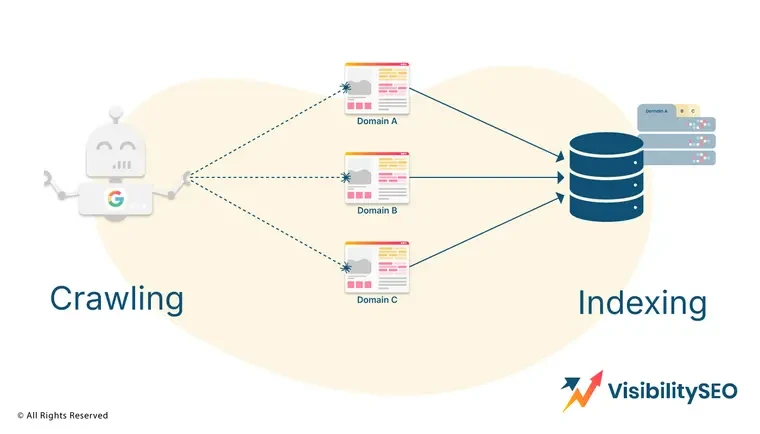
Crawl budget matters most on large, complex, frequently updated, or parameter-heavy websites. Reduce waste by controlling faceted navigation, duplicate filters, thin pages, redirect chains, internal search results, and low-value archives. Improve architecture so important sections are easy to reach. The aim is not to force every page into discovery. It is to guide attention towards pages that deserve evaluation.
Avoid Using Meta Refresh Redirects for Site Migrations
Meta refresh redirects happen inside the page rather than through clean server-side instructions. They can be slower, less reliable, and less suitable for migrations. Use proper 301 redirects when content moves permanently. Reserve other methods for rare cases where they are genuinely required. Migration signals should be direct, fast, and consistent, because uncertainty increases the chance of lost visibility.
Redirect Flash-Based Pages to Their HTML Equivalents
Flash content is obsolete for modern search and usability. If older pages still exist, redirect them to HTML equivalents that preserve intent, topic, and value. Do not leave users facing unsupported content, empty pages, or broken assets. Update internal links, external campaign references, and sitemap entries. This is a legacy task, but it can still matter for older domains.
Implement Hreflang Tags for Multilingual Websites

Hreflang tags help search engines serve the right language or regional version to the right audience. They must be reciprocal, accurate, canonical-aligned, and supported by clear URLs. Mistakes can cause the wrong country page to appear or competing language pages to confuse signals. Multilingual websites need disciplined governance. Review templates, sitemaps, canonicals, and content differences whenever new markets are added.
Verify That Website Tracking and Analytics Are Configured Correctly
Tracking must be reliable before performance can be judged. Check GA4 tags, conversion events, consent mode, ecommerce data, form submissions, call tracking, cross-domain settings, and duplicate tags. Broken analytics can make successful work look poor or hide serious problems. Technical SEO and measurement belong together. A fix should not only be deployed; it should be visible in trustworthy data.
Set Up Technical SEO Monitoring and Change Logs
Technical SEO monitoring keeps small errors from turning into expensive losses. Watch crawl behaviour. Watch the index. Check sitemap changes after every release. A redirect edit can break a journey. A robots update can hide a page. Speed can drop after one template change. Schema can fail quietly. Analytics may show the first warning. Change logs connect movements to actions, making effective SEO strategies easier to repeat with accountability.
4. Content Optimization
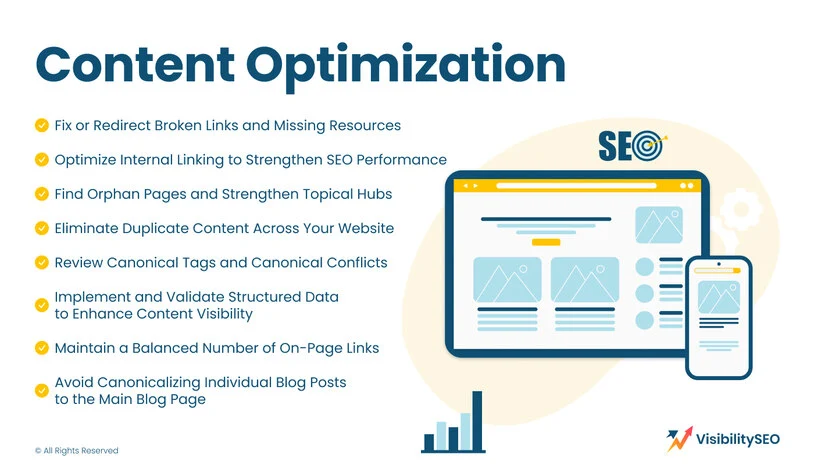
Content optimisation and technical quality support each other. Strong content cannot perform fully if links break, canonicals conflict, schema fails, or important pages sit outside the site structure. Technical SEO checks should review the content layer without rewriting every page. The goal is to remove technical barriers around relevance, duplication, discovery, and context. When content SEO and technical discipline work together, visibility becomes more stable.
Fix or Redirect Broken Links and Missing Resources
Broken links interrupt journeys and waste authority. Find internal links leading to 404s, missing images, deleted PDFs, outdated scripts, and old campaign paths. Replace them with live, relevant destinations or remove them when no equivalent exists. External broken links should also be reviewed, especially in trusted guides and resource pages. Fixing them improves user experience, crawler flow, and overall content credibility.
Optimize Internal Linking to Strengthen SEO Performance
Internal linking tells visitors and crawlers which pages matter. Link important pages from relevant content, navigation, hubs, breadcrumbs, and supporting articles. Use descriptive anchor text without forcing keywords. Avoid burying valuable pages too deeply. An internal link should clarify context and movement, not exist only for SEO. Strong linking improves discovery, authority flow, topical relationships, and conversion paths across the website.
Find Orphan Pages and Strengthen Topical Hubs
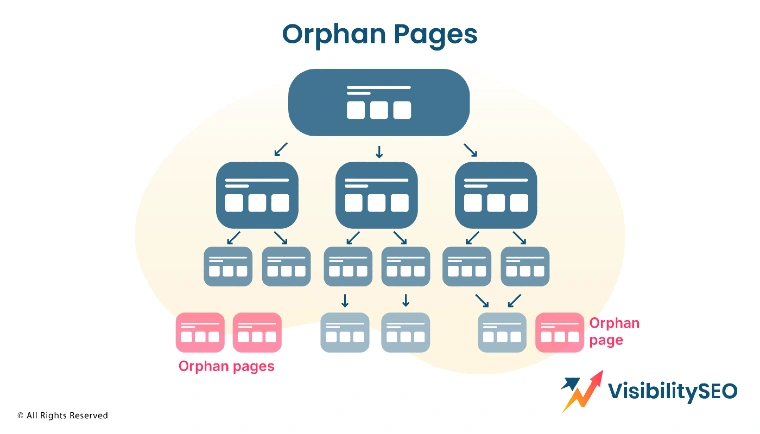
Orphan pages have no internal links pointing to them, making them harder to find and evaluate. Some are old campaigns. Some are useful pages that were never integrated. Identify them through crawls, analytics, sitemaps, and log data. Then decide whether to link, merge, redirect, or remove. Topical hubs should organise related content clearly, giving both visitors and crawlers a stronger route.
Eliminate Duplicate Content Across Your Website
Duplicate content can split relevance and weaken the signals around the page that should rank. It often appears when service pages are copied too closely. It can also come from printer versions, filtered URLs, tag archives, product variants, or location pages that barely differ. Some duplication is unavoidable. Unmanaged duplication is the risk. Use the right fix so the strongest page stays clear, useful, and accessible.
Review Canonical Tags and Canonical Conflicts
Canonical tags show the preferred version when similar content exists. They need to point to pages that are live, indexable, and relevant. Start with self-referencing canonicals. Then check cross-domain use. Look at paginated content and product variants with care. Parameter URLs need attention too. If canonicals disagree with redirects or internal links, search engines may ignore the signal and choose a different URL than intended.
Implement and Validate Structured Data to Enhance Content Visibility
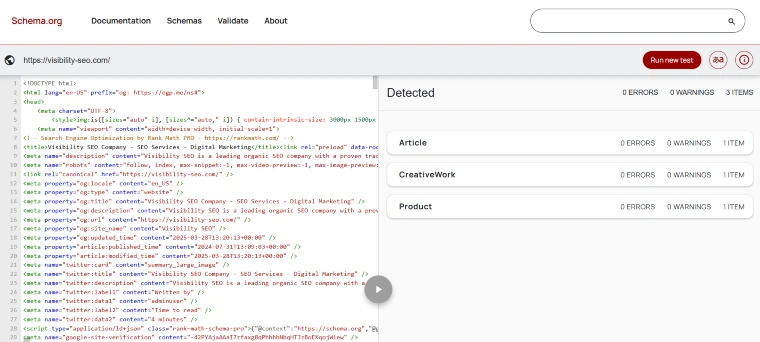
Structured data helps search engines understand entities, page types, products, reviews, FAQs, articles, breadcrumbs, organisations, and local SEO details. Add schema only where it matches visible content. Validate it after deployment, then monitor warnings when templates change. Structured data will not replace quality content, but it improves clarity. It can also support richer presentation, stronger context, and better machine understanding.
Maintain a Balanced Number of On-Page Links
Too many links can overwhelm visitors and weaken page focus. Too few can isolate useful content. Review menus, footers, sidebars, body links, related posts, filters, and repeated template links. The balance depends on page type and purpose. Important pages need clear routes, not clutter. A balanced link structure helps search engines understand priority while keeping navigation readable for real users.
Avoid Canonicalizing Individual Blog Posts to the Main Blog Page
Individual blog posts should usually canonicalise to themselves, not the main blog page. Canonicalising posts to an archive can remove their ability to rank independently. This mistake often appears after template changes, plugin conflicts, or migration shortcuts. Check blog templates carefully. Each article should carry its own topic, URL, metadata, schema, and canonical signal unless consolidation is genuinely intended.
5. Create a More User-Friendly Website

A user-friendly website is not separate from technical SEO. It is what strong technical decisions look like on the page. People should not have to fight the layout. Pages should load quickly and behave in a way that feels predictable. SEO focuses on discovery, but people decide what happens next. If users struggle to navigate, read, compare, enquire, or buy, technical performance still needs work.
Configure AMP Properly for an Improved Mobile Experience
AMP can support fast mobile delivery in selected cases, but poor setup creates more trouble than value. Canonical links must point correctly. Structured data needs to match the live page. Analytics should still record behaviour without gaps. The AMP version should feel consistent with the standard page, not thinner or weaker. If AMP creates duplication or tracking problems, a fast responsive website may be the stronger technical foundation.
Add Breadcrumb Navigation to Enhance User Experience

Breadcrumbs give visitors a quiet sense of direction. They show where a page sits and how to move back without friction. When structured data supports them, they also help search systems read the hierarchy more clearly. This matters for ecommerce, service hubs, blogs, and large resource sections. Keep labels short and aligned with the real site structure. Breadcrumbs should guide people, not replace clear navigation.
Improve Website Architecture, Crawl Depth and Navigation Paths

Website architecture decides how easily a page can be reached and understood. Important pages should not be buried deep unless there is a clear reason. Group related content in a way that feels natural. Build paths from broad interest to specific action. Navigation should guide. Hubs should connect. Breadcrumbs should confirm the route. Strong architecture helps search engines understand relationships while helping visitors move with less effort.
Test Your Website Across Multiple Devices and Platforms
Testing should not stop at one screen. Start with desktop, then check tablets, phones, browsers, operating systems, and slower connections in a more practical way. A page can look fine in one place and break somewhere else. Menus need testing. Forms need testing. So do videos, sticky bars, checkout steps, and text spacing. Technical SEO improves when real-device testing finds problems before customers do.
Check Forms, CTAs, Popups and Mobile Layout Shifts
Forms and CTAs often carry the commercial value of a page. Test whether submissions work and whether tracking records the action properly. Confirmation messages should appear clearly. Email delivery needs checking too. Popups should not block essential content or push the layout around on mobile. Watch banners, cookie notices, chat widgets, and ad placements. A stable page protects trust, reduces frustration, and keeps conversion opportunities alive.
6. Auditing Brand Signals to Enhance AI Visibility

AI SEO visibility depends on more than keywords. Systems need confidence in the business behind the website. They need to understand what it offers and why its information deserves trust. Auditing brand signals means checking whether the website tells the same story as the wider web. This is new technical SEO in practice. Cleaner entity signals create stronger context and reduce contradictions that weaken machine understanding.
Clarify Business Identity, Services and Entity Signals
Your website should make the business easy to understand. The name should be clear. Services should be explained without vague claims. Locations need to match how the business actually operates. Organisation schema and local business markup can support that clarity when used properly. Author details and service pages should reinforce the same message. Clear entity signals help AI systems and search engines understand identity, relevance, and authority.
Check External Brand Consistency Across the Web
External consistency strengthens trust because the wider web should confirm the same business story. Review Google Business Profile and Bing Places first. Then check social profiles, directories, review platforms, press mentions, partner pages, and citations without treating them as afterthoughts. Names should match. Contact details should match. Service descriptions should not drift. A strong technical brand audit makes the business easier to verify across the web.
FAQs
How do I know if a technical SEO issue is actually affecting rankings?
You know it matters when the issue blocks search engines from reaching the page or makes performance fall below accepted benchmarks. Check the URLs first. Look at traffic changes. Watch impression movement. Check crawl activity. Patterns matter. If the drop starts where the issue appears, you have a ranking problem.
Can small technical SEO issues become bigger problems over time?
Yes. Small technical issues can build quietly until traffic starts leaking. One stray robots.txt rule may block access. A slow template may frustrate users. A weak redirect pattern may waste crawl budget. None of it looks dramatic at first. Over time, rankings suffer because the foundation keeps getting weaker daily.
How long does it take for technical SEO fixes to show results?
Some fixes help quickly. Others need patience. A technical SEO fix may show movement in 2 to 4 weeks. However, bigger changes can take 3 to 6 months. Google needs to crawl the site again. Then it must process update. Scale matters, so track results before drawing conclusions with context.

- SEO Consultant vs SEO Agency – What is the Difference? - June 25, 2026
- FAQ Schema: A Simple SEO Trick for Better Visibility - December 20, 2025
- What Is YMYL and Why It Matters for SEO? - December 16, 2025