A speedy site is not a nice-to-have but a must-have. If you possess an e-commerce site, blog, or business website, slow page load times can scare away users and damage your search engine rankings. Therefore, in today’s online age, one of the greatest performance enhancements to provide for your site, boost user satisfaction, and your overall web presence is to improve site speed.
What is Site Speed?
Site speed is the speed at which your site loads and reacts when a user visits it. It encompasses page load time, which is the overall time required for a web page to completely load its content. It also considers how quickly individuals can engage with page elements, like buttons or forms.
Website performance is a key aspect of user experience. A slow site can frustrate users and send them running before your content has even fully loaded. Site speed also encompasses critical timing metrics such as first contentful paint and largest contentful paint, which quantify how quickly visible content begins to load.

Why is Site Speed Important for SEO?
Page speed is an established Google ranking factor on mobile devices at least now. This means that the faster sites rank better than the slower ones. If your website is taking too long to load, then customers will likely switch and depart sooner, raising your bounce rate.
A high bounce rate indicates to search engines that your users are not finding your site useful. Speeding up your site speed and site performance will not only increase your rankings but also make your website more pleasurable to visit. It makes your data available on multiple devices at the same time.
How to Measure Page Speed
To optimize website speed, you must begin by doing a speed test. It will enable you to analyze how fast your website takes to load and how it reacts in different situations. Average speed testing tools give you real user metrics, so you can actually view what your real visitors are seeing.
Utilize several tools to monitor and monitor your site’s performance. You can make your webpage an experiment with Google PageSpeed Insights, GTMetrix, or Pingdom. The experiments provide insightful information on metrics of time such as cumulative layout shift and largest contentful paint.

Key Website Load Time Statistics
The slower your page load, the higher the risk that users will leave. These numbers show just how important it is to monitor and improve your site speed regularly. Every extra second your website takes to load costs you potential customers or readers. In competitive markets, where users have endless options, even a short delay can lead them to choose a faster site instead. Your load time significantly affects bounce rates. Studies show:
- 1-3 seconds: Increases bounce rate probability by 32%.
- 1-5 seconds: Increases bounce rate probability by 90%.
- 1-6 seconds: Increases bounce rate probability by 106%.
- 1-10 seconds: Increases bounce rate probability by 123%.
Optimizing load times is not only about user happiness—it also helps with SEO and web performance objectives. Faster pages yield more engagement, reduced bounce rates, and increased conversions. Optimizing your site speed is one of the easiest strategies to get an advantage in both search ranking and user experience. By focusing on performance, you indicate to users—and search engines—that your site is designed to serve them fast and efficiently.
14 Ways to Improve Page Loading Speed
Optimizing site speed involves both technical and visual improvements. The goal is to load your webpage quickly without compromising quality. Here are 14 proven methods:
1. Choose the Right Hosting Service Plan

Selecting the ideal hosting service plan is the building block of a solid website performance. Your hosting company has a direct effect on your site’s speed, uptime, and capacity to serve traffic. Knowing what separates hosting options allows you to make the optimal choice according to your site’s size, traffic, and growth strategies.
- Shared Hosting
This is the most affordable type of hosting, but it shares resources with other sites. It can result in slower performance and higher page load times during peak traffic. If another website on the server experiences a spike, your site speed could suffer too. It’s best for very small sites with limited traffic.
- VPS Hosting
A virtual private server gives you more control and better performance than shared hosting. It’s a great mid-level option for improving website speed. You get dedicated space and resources, improving uptime and response times. This option is ideal for businesses ready to scale without going fully dedicated.
- Dedicated Hosting
You get the entire server to yourself. This is ideal for large businesses looking to optimize site speed, track real user metrics, and support large volumes of data. It offers maximum flexibility and high-level performance. While it’s more expensive, the gains in site speed and control can be worth the investment.
- Serverless Hosting
This new model allows your website to scale automatically. It can increase site performance by reducing the delay caused by traditional servers. It works well for websites with unpredictable traffic. Because you only use resources when needed, it can also help reduce costs while improving performance.
2. Compress and Optimize Your Images
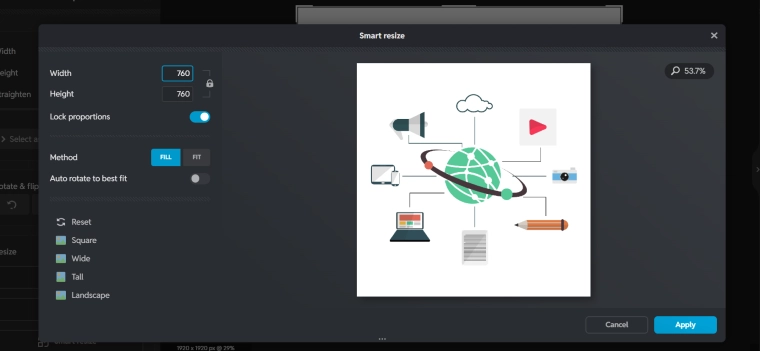
Large images can slow down your page. Compressing them reduces file size while keeping visual quality. You can use online tools or plugins that optimize your images automatically. This helps your site load quickly on different devices. Smaller image sizes reduce page load time and lower server requests.
3. Choose the Right Image Format
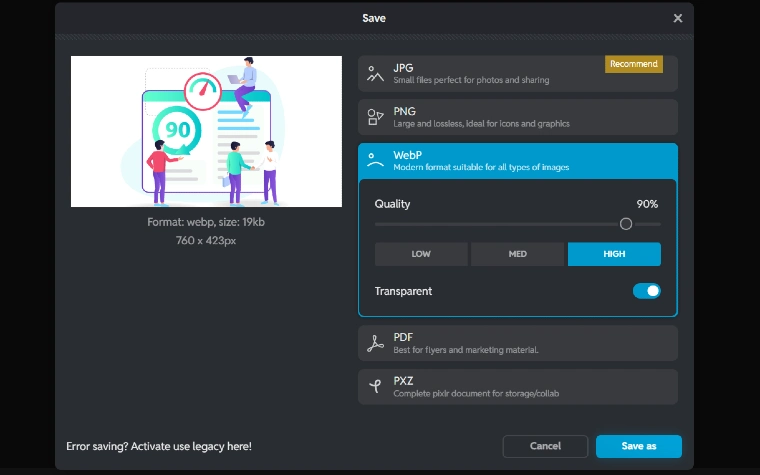
Selecting the right image format plays a major role in website speed and performance. Different formats serve different purposes, and choosing wisely can reduce load time without sacrificing visual quality. Let’s look at the most commonly used formats and when to use each one for optimal results.
- JPEG
Best for photos and rich color visuals. Smaller file sizes mean quicker page loads. JPEGs are widely supported and offer good compression without too much quality loss. Use them for blog images, banners, and visual backgrounds.
- PNG
Great for graphics with transparency. These are bigger in size but offer higher quality. PNGs are ideal for logos and graphics where clarity matters. They work well when you need sharp detail and a transparent background.
- GIFs
Useful for simple animations. Use sparingly to prevent slowing your website. They tend to be larger files, which can hurt page speed. Consider replacing them with CSS animations or lightweight video formats when possible.
- WebP
Modern format offering small file sizes and high-quality visuals. Supported by most modern browsers and improves performance. WebP balances quality and speed better than older formats. Switching to WebP can significantly reduce image-related page load delays.
4. Keep Redirects to a Minimum
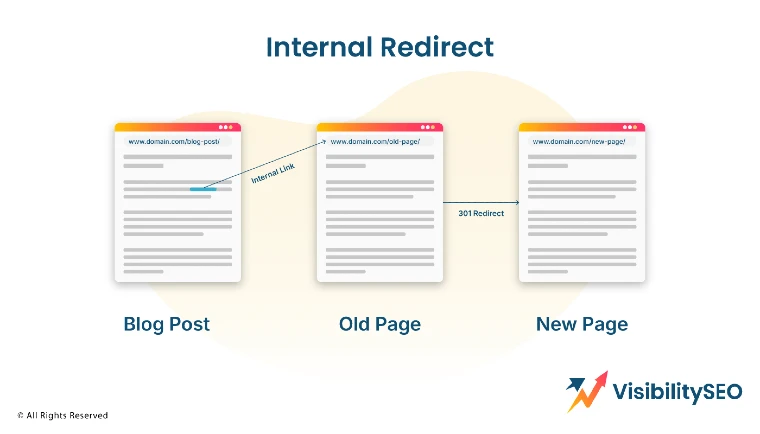
Redirects create extra HTTP requests and increase page load time. Keep them to a minimum to optimize your web performance. Every extra request slows your site down, so remove unnecessary redirects wherever possible. Use tools to find outdated or broken redirects and clean them up.
5. Cache Your Web Pages
Caching stores a version of your site so it loads faster for repeat visitors. It reduces the need to load everything from scratch. This is essential for improving load time and supporting a seamless experience. Cached pages improve web performance and reduce bounce rate.
6. Enable Browser Caching
With browser caching, your site stores data in the visitor’s browser. This improves site speed for return users. It’s a simple yet powerful way to boost site performance and lower bounce rates. Assets like CSS files, images, and scripts load faster when they’re already stored in the browser.
7. Minify CSS, JavaScript, and HTML

Minifying removes unnecessary characters from your code. This reduces the size of your page files. Smaller files mean faster downloads and quicker page load times. It also helps browsers process and render your webpage more efficiently. Use tools like UglifyJS, CSSNano, or HTMLMinifier to automate the process.
8. Optimize CSS and JS with Async and Defer
Loading CSS files and JavaScript with async or defer tags prevents them from blocking page content. This helps the page render faster and improves metrics like first contentful paint. It allows users to see and interact with your content sooner. Prioritize critical CSS and defer non-essential scripts for better page load time.
9. Use a Content Delivery Network (CDN)
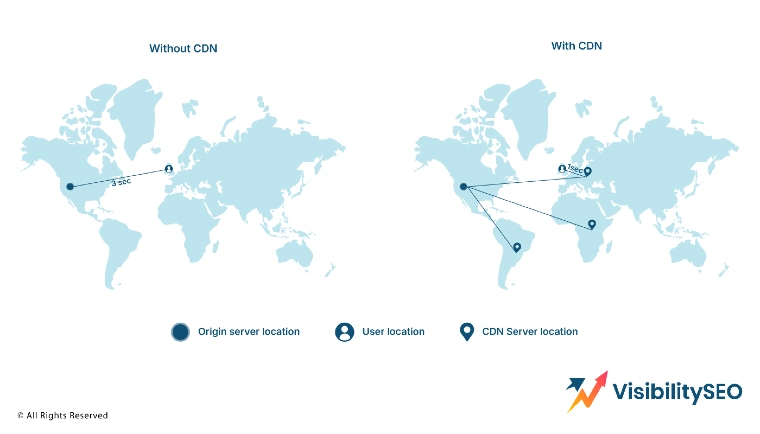
A CDN distributes your content across multiple servers around the world. It speeds up delivery to users no matter where they are. Using a CDN can dramatically improve global web performance and optimize load time. CDNs also reduce the load on your origin server, making your site more stable during traffic spikes. Popular CDN providers include Cloudflare, Akamai, and Amazon CloudFront.
10. Reduce the Number of HTTP Requests
Each element on your page makes an HTTP request. Fewer requests mean faster load time. Combine files, streamline your design, and remove unused page elements to reduce requests. Fewer fonts, scripts, and icons lead to a faster, leaner site. Use browser tools to track and analyze your current request load.
11. Switch to HTTP/2
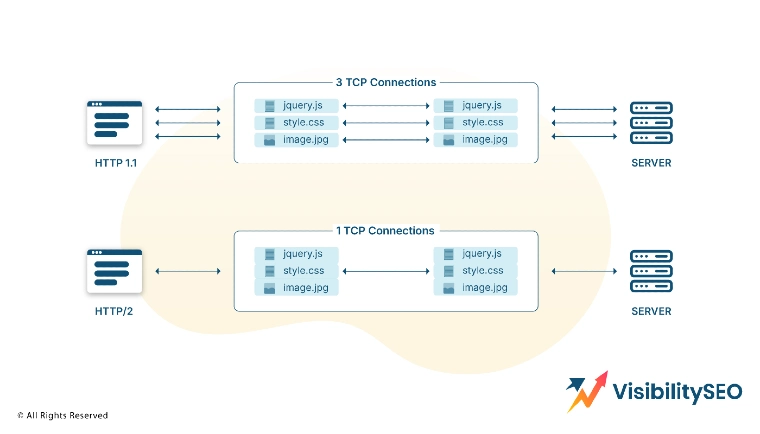
HTTP/2 allows multiple requests to be sent at once, reducing delay. It also improves performance for both mobile and desktop users. It supports header compression and prioritization of content, which speeds up page rendering. Most modern browsers support HTTP/2, so enabling it gives your site a performance edge.
12. Write Mobile-First Code

Most users access websites from their phones. Prioritize mobile speed by writing responsive, mobile-first code. This ensures your website performs well on smaller screens and different devices. Mobile-first design leads to cleaner, faster-loading pages. It also aligns with Google’s mobile-first indexing strategy.
13. Reduce the Number of Unnecessary Plugins
Too many plugins can clutter your site and slow it down. Audit your plugins regularly. Remove or replace ones that impact performance or duplicate functionality. Always choose lightweight plugins that are regularly updated and supported. A cleaner backend leads to better site speed and stability.
14. Minimize Time to First Byte (TTFB)
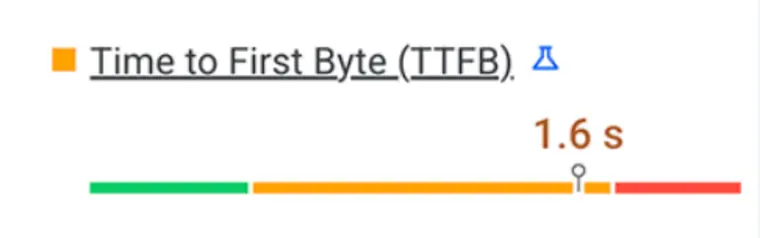
TTFB measures how long it takes for a browser to get the first byte of your site. A low TTFB improves perceived speed. Optimize your server and backend systems to reduce TTFB. You can also use caching, CDN support, and fast DNS providers to reduce this time. Monitoring TTFB helps you diagnose deeper server-side issues.
Improving page load time requires a mix of smart coding, strategic resource use, and ongoing analysis. Whether you’re compressing images, optimizing CSS files, or upgrading your hosting, every improvement adds up to a faster, more responsive site.
A well-optimized website not only enhances user experience but also boosts SEO rankings, lowers bounce rates, and increases engagement. By consistently applying these 14 strategies, you’ll ensure your website performs at its best—no matter the device, user, or location.
Tools to Measure Page Speed
There are many tools to help you analyze and test your website speed. Using more than one provides a full picture. These tools track timing metrics, reveal bottlenecks, and offer clear suggestions to improve your site performance.
1. Google PageSpeed Insights
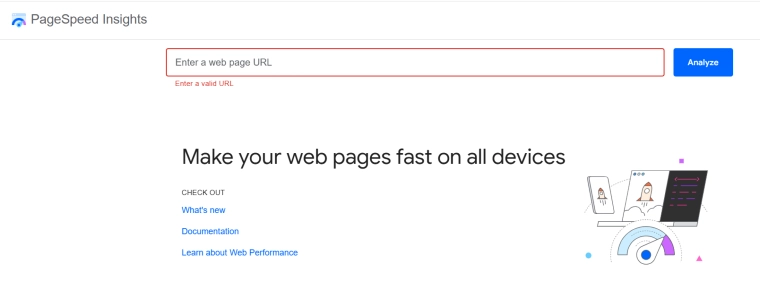
Google PageSpeed Insights provides insights on mobile and desktop site speed. It includes core web vitals like cumulative layout shift. This tool scores your page and gives specific actions to improve. It’s a go-to resource for optimizing website performance and user experience.
2. GTMetrix

GTMetrix offers a deep dive into performance data. It’s great for testing page elements and getting real-world tips. GTMetrix shows waterfall charts to break down each request, and tracks metrics like largest contentful paint and total blocking time.
3. Pingdom

Pingdom quickly shows your website’s performance and load time. It also offers historical tracking. All in all, Pingdom is easy to use and gives visual breakdowns of site speed test results. It’s great for ongoing monitoring and spotting trends over time.
4. WebPageTest
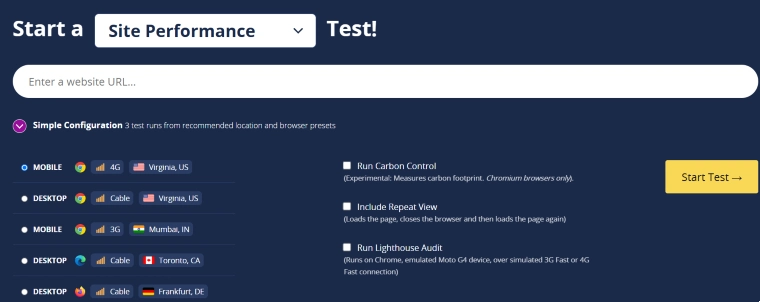
WebPageTest lets you simulate load times from different parts of the world. It tracks first contentful paint and other timing metrics. Then, you can test your site across different devices and browsers. This is helpful for understanding how your site performs in the real world.
5. Google Chrome DevTools
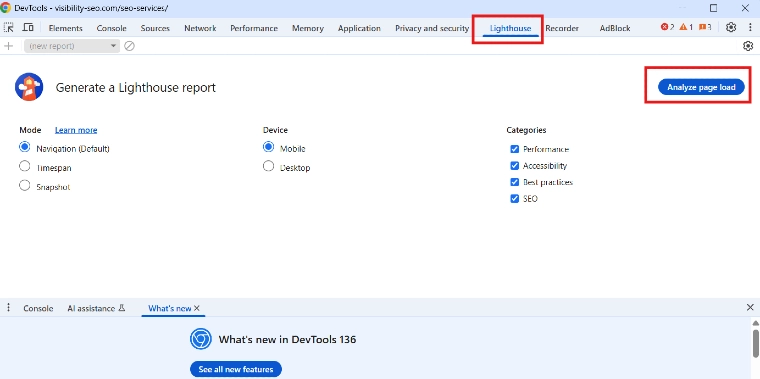
Built into the Chrome browser, this tool offers in-depth analysis of how your page performs. It lets you inspect page elements, monitor network requests, and track web performance live. Overall, DevTools is essential for debugging and fine-tuning your site’s load time.
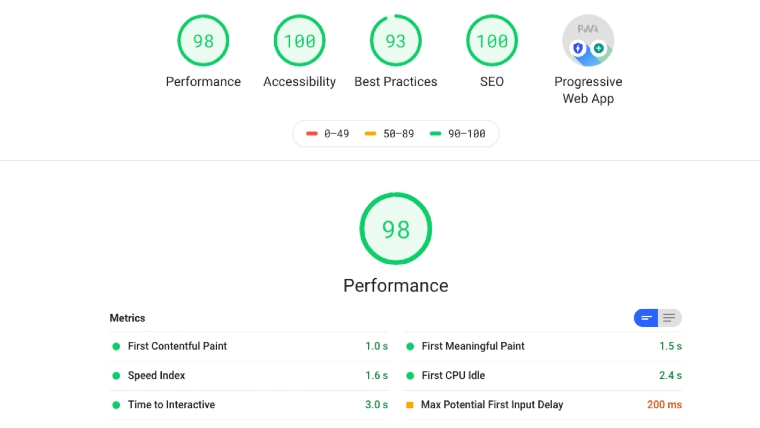
Using the right speed test tools is essential for maintaining a high-performing site. Each one provides unique insights into your page speed, load time, and user experience across different devices. By combining tools like Google PageSpeed Insights and GTMetrix, you can analyze, test, and optimize effectively. Regularly using these resources ensures your website continues to load quickly and meet performance standards.
Your Website’s Speed Is Its First Impression
Your site speed is one of the first things users notice. A slow site creates a negative impression before your content even loads. People often judge the professionalism and credibility of a site based on how quickly it responds. If your site feels sluggish, users may assume your service or product will be too.
By using the right tools and strategies, you can optimize your site for better web performance. A fast-loading site builds trust, keeps users engaged, and supports your business goals. Site Speed not only improves user experience but also boosts your rankings in search engines. Prioritizing page load time gives your brand a competitive advantage in a fast-paced digital world.
FAQs
What are the limitations of free site speed tools compared to paid versions?
Free site speed tools offer basic performance data and testing. However, they often have limits on test frequency, features, and customization. Paid versions provide deeper insights, historical data, and advanced tracking options. For businesses with high traffic, investing in paid tools offers a more complete analysis.
How do core web vitals affect the page speed?
Core web vitals are a set of performance metrics from Google that measure real user experience. They include first contentful paint, largest contentful paint, and cumulative layout shift. These metrics directly impact your page speed score and SEO ranking. Optimizing them improves both user satisfaction and search visibility.
What is the best page speed score?
A score of 90 or above on Google PageSpeed Insights is considered excellent. It means your site loads quickly and offers a good user experience. However, scoring 100 isn’t always necessary; aim for consistent performance across all devices. Focus on real user metrics more than just the number.
How can integrating multiple site speed tools provide a more comprehensive analysis?
Each tool offers different insights and strengths. Using multiple speed test platforms helps you cover various aspects of site performance. Some focus more on real user data, while others offer detailed breakdowns of page elements. A combined approach gives a fuller, more accurate view of how your site performs.

- SEO Consultant vs SEO Agency – What is the Difference? - June 25, 2026
- FAQ Schema: A Simple SEO Trick for Better Visibility - December 20, 2025
- What Is YMYL and Why It Matters for SEO? - December 16, 2025