Being ranked on Google search results should be among the highest goals of any website owner, and if you wish to gain this, using tools such as the schema markup can help. The tool is among the best methods of improving search engine optimization since it helps search engines know your web pages better.
Overall, it can provide you with enriching results provided that you utilize it to its entirety and on a regular basis, so you can rank up online. Read more about how schema markup functions and the reasons why it is essential for every website owner.
What is Schema Markup?
Schema markup is a type of structured data that you place on your web pages. It is in a standard format that informs search engines what your content is about. For instance, if you have a recipe on your website, schema markup can inform Google the ingredients, cooking time, and calories. This allows search engines to display your content in a more useful and attractive manner.
Your task is to allow the tool to comprehend what you’re aiming to convey on the web. You would like it to be as easy as possible so that you can easily communicate what your services or products are on the web. What you’re gathering here will become the foundation for how you’re categorized on the web, so you know your content is being filtered and ranked as such.

How Does Schema Markup Work?
Schema markup takes effect by introducing special code to the HTML of your website. This code is in a language that is readable by big search engines such as Google, Bing, and Yahoo. When you include schema markup, you’re essentially providing search engines with additional details about your content. This added information might make your website rank in rich snippets, which are improved search results that provide additional information such as images, reviews, or ratings.
Typically, individuals only skim on search engines for immediate solutions, sometimes leading them to search even further on sites. Your idea is to make a presence as soon as possible, so the more you contribute useful content to this additional information, the better chance you’re going to get the action and eventually turn them into customers.
Types of Schema Markup
There are many types of schema markup you can use depending on the kind of content you have. Each type helps you differently. By using the right type, you can improve how your web pages appear in Google search results.
Organization Schema Markup
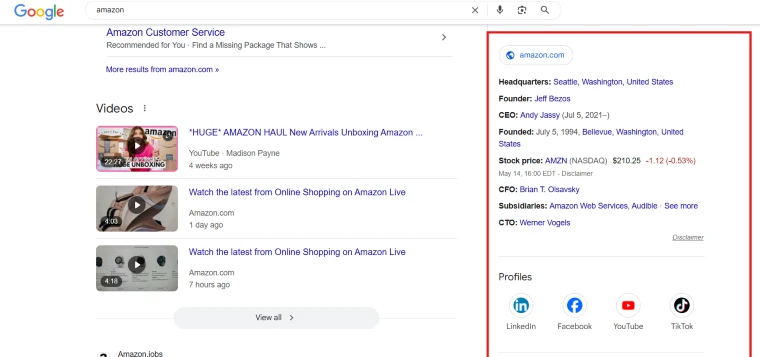
Organization schema tells search engines basic information about your company. This can include your name, logo, contact details, and social media profiles. Adding organization markup helps people trust your brand more and can also make your business info show up in a special box in search engine results.
Here, you should maximize the visibility by adding the relevant information about your organization. It should be simple and straight to the point while also establishing your branding. Set the right tone and make an impact right off the bat.
Product Snippets Markup

If you sell items online, product snippets markup is super helpful. It allows you to display your product name, price, availability, and rating directly in the search results. This makes your product stand out and can lead to more clicks and sales.
People find it more convenient if you show what you offer in full detail, usually including the prices and dimensions. This saves them time, so your audience would actually prefer that they see what they’re looking for before diving deeper into your site.
Person Schema Markup

Person schema markup is used to provide details about a person. This can include their job title, company, social media, and bio. It’s great for websites that feature public figures or staff profiles. This type of markup helps search engines understand who the person is and how they relate to the content.
If you’re more about selling your services, focusing on highlighting your profile is great as well. This particular schema is an effective way to showcase your strengths and services, allowing Google to pick up on these to boost on search engines.
Review Schema Markup

Review schema markup lets you show star ratings, reviewer names, and review dates in the search results. When you use review schema markup, your web pages look more trustworthy and appealing. This can lead to more people clicking on your link because they can see that others liked your content or product.
One of the fastest ways to gain trust online is to use the power of reviews. You want to build this trust right away to seal deals and boost your brand even more. Testimonies will be your friend when used the right way.
Article Schema Markup

If you post blog articles or news stories, article markup helps. This markup tells search engines the headline, publish date, author name, and images. With this structured data markup, your content can appear in special features like Top Stories in Google.
If you’re more about promoting content online, this is your best bet. However, you want to only add relevant content that is informative and helpful to your audience, so make sure that you’re giving them something worthwhile to read and digest.
Local Business Markup
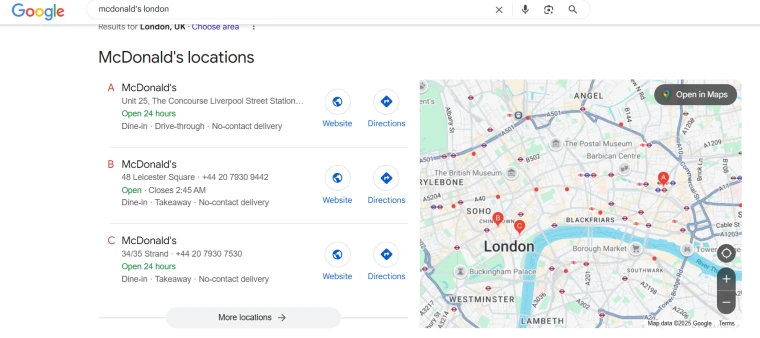
Local business markup is super helpful for companies that want to show up in local search results. It tells Google your business name, address, phone number, hours, and more. This helps people nearby find your business quickly and easily. It also improves your chances of appearing in map results.
If you have a local shop, going online is a way to keep up with the trends. Being connected makes every transaction faster and much more efficient. Using this tool can help you boost your visibility locally.
How to Know if a Page or Website Has Schema Markup
So, how can you tell if a website or page already has schema markup? Luckily, some tools help you check. These are some of the most used tools by site owners that will make it easier for you to navigate and study sites to help you understand how SEO works.
- Use Schema.org Validator
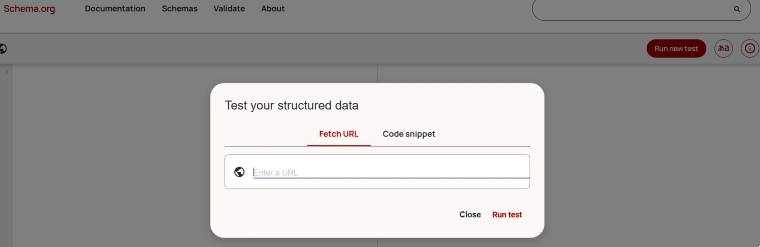
Another great tool is the Schema.org Validator. You can paste a URL into the tool, and it will show you all the structured data found on that page. It also checks if the code follows structured data guidelines.
Like the SEO Pro Extension, you can simply add the URL of the site you want to inspect, and you will immediately be shown a detailed list of the type of schema markup that a platform is using, allowing you to gauge how a site works.
- Use Site Audit Function by SEMrush

SEMrush is a powerful SEO tool. Its Site Audit feature scans your whole website and tells you where you need to add schema markup. It’s great for finding problems and fixing them fast.
This is used for those who want to direct their focus on their sites and see what is the most effective way to rank online. It can detect which ideal parts of your pages need a schema markup and suggest what to specifically use.
These tools are essential for anyone serious about improving their search engine optimization strategy. Regular checks of your pages for structured data help you stay ahead of the competition and ensure your site remains fully optimized for search engines.
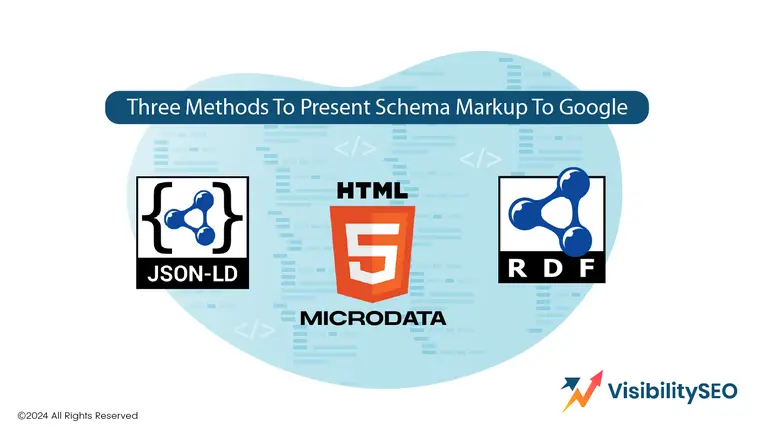
Three Ways to Communicate Schema Markup
There are three main formats you can use to add structured data to your site. Each one has its pros and cons, but they all help improve how your content is understood and displayed in search results.
- JSON-LD (JavaScript Object Notation for Linked Data)
JSON-LD markup is the most recommended method. It’s easy to use and doesn’t mess with your HTML. You just add a script tag in your website’s code. Google prefers JSON-LD because it keeps the content and the code separate.
We all know how complicated SEO can get, but with this tool, everything is simplified. If you’re just starting and want to have a simple method to help boost your site, JSON-LD is not only preferred by Google, but it’s also a reliable tool used to quickly and cleanly operate your code.
- Microdata
Microdata is a way to add in page markup. You place it directly inside your HTML tags, and it will help you gain visibility online by making your content easier for search engines to read. This format helps generate rich snippets, which can make your listings more attractive in search results and improve your click through rates.
While it works fine, it can make your code messy and harder to manage. This is not for beginners, but it’s still an effective method to use, especially if you want to learn more about proper coding, giving you more control over how you want your pages to appear online.
- RDFa (Resource Descriptive Framework in Attributes)
RDFa is another format for structured data. It uses HTML attributes to describe data. Like Microdata, it’s more complicated than JSON-LD, but it’s still supported by major search engines.
RDFa is especially useful when you need to add structured data to existing HTML content without changing the structure too much. It’s often used in more complex websites or academic and government sites where detailed metadata is needed.
All three formats are supported under structured data guidelines, so choosing one depends on your needs and skill level. Whether you’re using JSON-LD, Microdata, or RDFa, the key is to make your content easier for search engines to understand and display.

How to Implement Schema Markup on Your Website
Adding schema markup to your site might sound hard, especially for beginners, but it’s actually easy with the right tools. Here’s a step-by-step guide that you can easily follow for simplification:
1. Go to Google’s Structured Data Markup Helper Tool
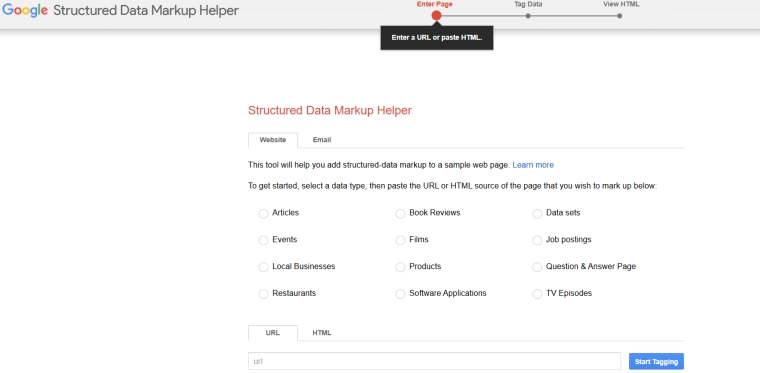
This free tool from Google helps you create schema markup quickly. It’s perfect for beginners who want an easy way to get started with structured data.
Just search for “Google Structured Data Markup Helper” on Google and click the link. No sign-in is required, and it works right in your browser.
2. Select a Data Type

Choose the type of content you want to mark up. The tool gives you several options, like articles, products, events, local businesses, and more.
Picking the right data type is important because it helps search engines understand exactly what your page is about.
3. Paste Your URL

Once you’ve selected your content type, paste the URL of the page you want to mark up. This tells the tool where to pull your content from.
If your page isn’t live yet, you can also paste your HTML code directly instead of a URL. This is useful when you’re working on a draft page.
4. Start Marking Up Your Page
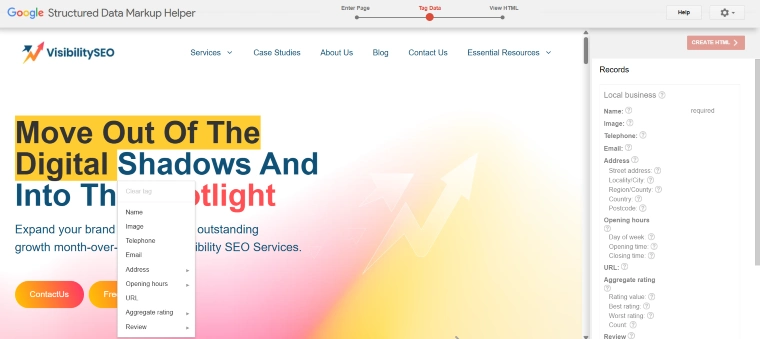
Highlight different elements of the page, like the title, image, author, or date. Then select what each element is from the menu.
The tool will automatically generate the proper structured data markup for each item you tag. It’s a simple point-and-click system.
5. Generate the HTML
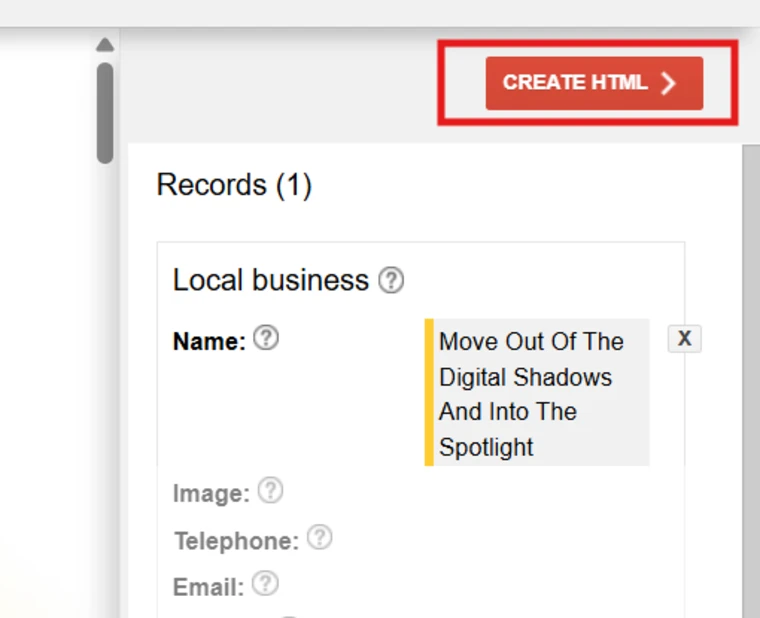
Once you’re finished tagging everything, click the “Create HTML” button. The tool will create the JSON-LD markup for your page.
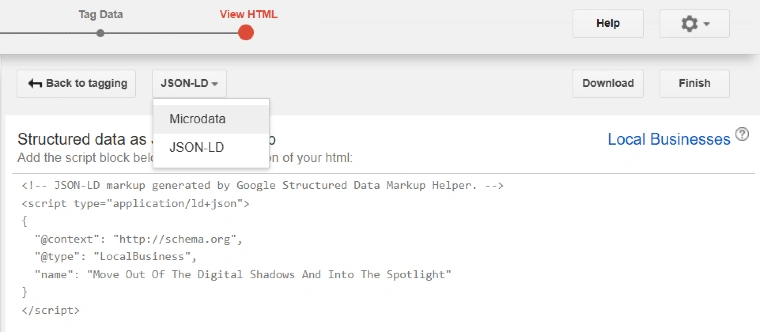
This code follows the format that major search engines like Google recommend, making it easier for them to understand your content.
6. Add the Markup to Your Page
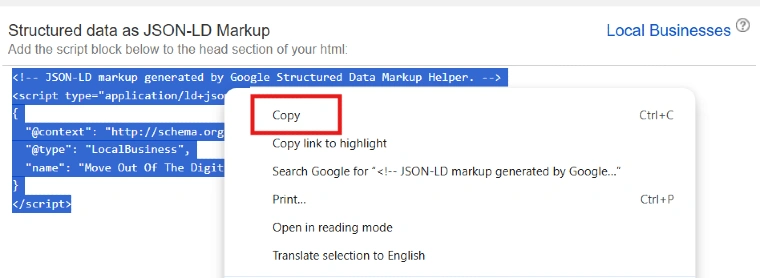
Copy the schema markup code and paste it into the section of your page’s HTML. This ensures it loads with the rest of your site.
If you use a content management system like WordPress, you can also add it using a plugin or through Google Tag Manager.
7. Test Your Schema Markup
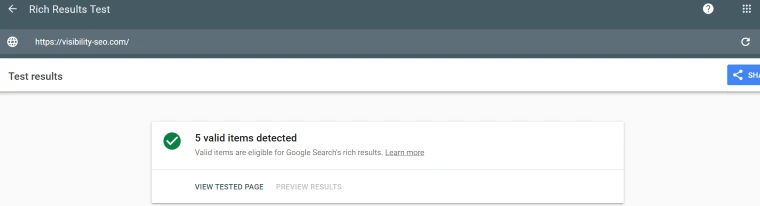
Use tools like Google Search Console or the Rich Results Test to make sure your code is working properly. These tools show you if there are any errors.
Testing is important because even small mistakes can prevent your rich results from showing up in Google search results.
Adding schema markup to your website is one of the best ways to improve how your content appears in search engines. It helps your site stand out in search results and gives users more useful information at a glance. With tools like these, anyone can start using structured data to boost their SEO. It’s a simple step that can lead to big results.

What Are the Benefits of Schema Markup?
Adding schema markup to your website brings a lot of benefits that help you get more traffic and stand out in search. These are tools popularly used for a reason, so making the most out of them will give you an edge online.
Make Your Content Easier for Search Engines to Interpret
Schema markup helps search engines understand what your content is really about. This makes it easier for them to show it to the right people. It also improves how your content is displayed, often leading to rich results in Google search.
Again, your aim is not to waste your audience’s time, so you want to only display the most relevant content you have. With schema markups, you wouldn’t have to think anymore about which content is deemed useful for Google because it’s doing the choosing for you.
Build a Content Knowledge Graph and Reuse It Within Your Organization

When you organize your content with structured data, it becomes easier to use and reuse in other tools, like chatbots or voice assistants. This structured content can be turned into a knowledge graph, which keeps your information consistent across platforms.
This is an efficient method to utilize the gathered data to your advantage, saving you time in boosting your SEO practices. Since it applies to other SEO ways, you can make the content knowledge graph your standard basis for disseminating information online.
Prepare Your Website for the Future of AI-Powered Search

As search engines get smarter, they rely more on structured data. Adding schema helps you get ready for the future of AI-powered search. Websites using schema will have an easier time adapting to voice search, AI assistants, and other new technologies.
Everything is connected right now through optimization, and using this tool will give you a cleaner and effective approach to staying relevant online by following the trends suggested by Google.
Control How Your Brand Appears in Search

Schema markup gives you more control over your brand’s appearance in search engine results. You can show your logo, contact info, and more. This makes your listings look more professional and builds trust with users before they even click.
Help You Stand Out in Search With Rich Results

Rich results like stars, images, and FAQs make your listing more eye-catching. This helps people click on your site instead of someone else’s.
- Review Snippets: Show star ratings and review details in search results to build trust fast. The more testimonies you have, the better visibility you’ll get.
- Product Rich Results: Display prices, availability, and product details to attract shoppers right from the Google search page. This makes your customers appreciate you more for the convenience that you’re offering.
Drive Business Results

Using schema markup the right way can bring real business growth. It helps increase visibility, attract more qualified traffic, and improve your overall search engine optimization strategy.
- Match Your Content to High-Intent Search Queries: Schema helps your content show up for people who are ready to take action, like buying a product or calling a service.
- Increase CTRs With More Attractive Search Listings: When your listing includes rich info like stars and prices, more people click on it. This means higher click-through rates (CTRs).
- Gain Extra Value if You’re a Local Business: Local search results are super competitive. Schema markup helps your business show up with important info like hours and phone numbers.
Attract Job Applicants
If your site lists jobs, you can use schema to show them in special job search features on Google. This helps you reach more job seekers easily. It also improves the chances of your listings showing up in local search results for people actively looking for jobs in your area.
You’re not only helping your website thrive online, but you’re also helping out people locally. It’s a win-win situation that boosts visibility and quickens business growth.
Schema markup is one of the simplest ways to improve how your website performs in search. It helps your content get noticed, adds value to your listings, and makes your brand more visible and trustworthy. All in all, it’s a small step that leads to big improvements in both user experience and search engine performance.

Start Implementing Schema Markup Today
Now that you know what schema markup is and why it matters, it’s time to start using it. Use a schema generator or Google’s tool to create your markup and test it to make sure it’s working. Whether you’re running a blog, online store, or local business, implementing schema markup is one of the best ways to improve your search engine optimization.
Schema markup might seem technical at first, but once you get the hang of it, it becomes a powerful tool in your SEO toolbox. You don’t need to be a developer—many content management systems offer plugins that make it easy to add schema without touching any code. Taking the time to learn and apply it now can set your website up for long-term success in an ever-changing digital landscape.
FAQs
Does schema markup help SEO?
Yes! It helps your site appear in rich results, which makes it more visible and attractive in search engine results. It gives search engines more context about your content, leading to better rankings and more clicks. With this, you can improve your chances of standing out from your competitors. As long as you use it optimally, you can eventually gain traction online.
Should I add schema to every page?
You don’t have to, but it’s a good idea to add schema to important pages like products, articles, and contact pages. Start with the pages that bring the most traffic. Then, focus on pages where rich snippets would be most helpful. The more helpful the markup, the better the user experience.
Where do I paste schema markup?
Paste it in the HTML of your page, usually in the head section, or use Google Tag Manager. You can also insert it through a CMS plugin if you’re using WordPress. For these tools, you can use JSON-LD format for easier integration. And before anything else, always test your code before publishing.
How to see what schema markup your competitors use?
Use tools like the SEO Pro Extension or the Schema.org Validator to look at your competitor’s structured data. You can also inspect their pages using browser developer tools for more ease when you want to study their schema. Look for script tags labeled application/ld+json as cues. With this, you can get ideas for improving your own.
Where do I add schema markup?
You can add it directly to your HTML or use a plugin or content management system like WordPress. You can also use a schema generator to help you come up with the ideal suggestions for your page. Simply place the code in the head or body of your page, depending on your setup. And always follow structured data guidelines to avoid errors.

- SEO Consultant vs SEO Agency – What is the Difference? - June 25, 2026
- FAQ Schema: A Simple SEO Trick for Better Visibility - December 20, 2025
- What Is YMYL and Why It Matters for SEO? - December 16, 2025