
Structured data is data that’s organized in a table or database. Unlike unstructured data, it’s searchable using standard methods because it’s organized.
Unstructured data needs advanced tools to analyze and interpret. That’s why structured data is a business asset.
What is Structured Data?
Structured data seems complex at first with terms like “standardized code format” or “relational databases.” Simply put, it’s code that tells search engines more about your page.
For example, instead of guessing a page is a recipe, structured data confirms it. That helps search engines rank your page better. Users don’t see structured data, but it can create rich snippets like showing a product’s price, rating, or reviews in search results.
Using structured data is easier than it sounds. Tools like Google’s Structured Data Markup Helper can generate schema markup, and testing tools like Google’s Structured Data Testing Tool can test your code before you add it to your page.
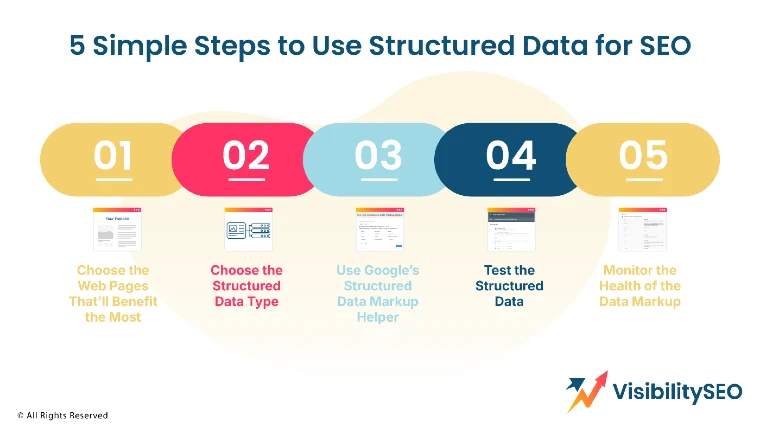
5 Simple Steps to Use Structured Data for SEO
1. Choose the Web Pages That’ll Benefit the Most
Decide which pages on your website should have structured data before you add it.
For example a how-to article on cleaning gutters could use how-to schema markup. A blog post about company news might not need structured data.
Your website might have a few pages or many.
Keep track of your structured data updates, especially for older pages. Use a spreadsheet like Microsoft Excel or Google Sheets to log the URL, the schema markup applied, and the date it was updated.
2. Choose the Structured Data Type
Choose the structured data you want to use next. Sometimes, this step might overlap with the previous one.
For example, while organizing pages, you might also decide on the schema markup to use.
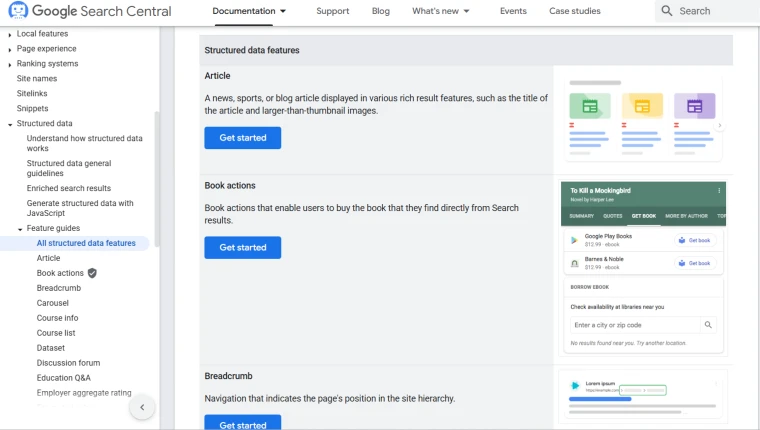
Use whichever approach works for your team. You can find all the structured data types in Google search gallery.
3. Use Google’s Structured Data Markup Helper
Once you’ve chosen your pages and structured data, you can start coding. Google’s Structured Data Markup Helper makes this easy.
If you need structured data for email communications like flight or hotel confirmations, this tool can also help.
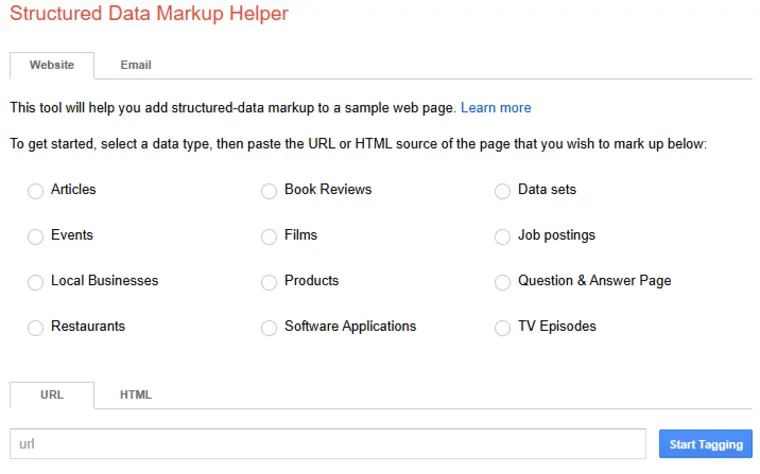
To use the Structured Data Markup Helper follow these steps:
- Select your data type, such as event or product.
- Enter your page URL or page HTML.
- Click “Start Tagging.”
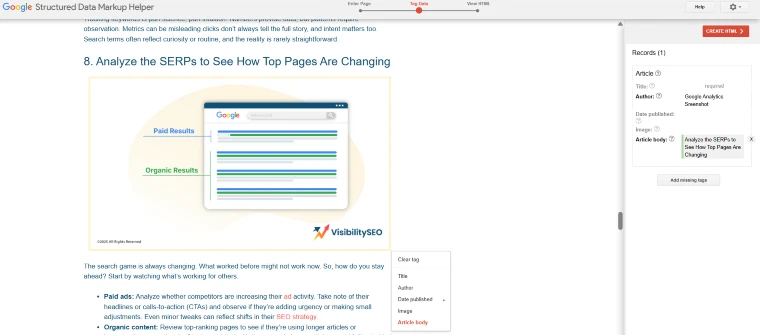
After the page loads, take these steps:
- Highlight the relevant text.
- Choose the correct tag from the drop-down menu.
- Use “Add missing tags” to add any tags you couldn’t highlight.
- Click “Create HTML.”
Once your schema markup is ready, click “Finish” or “Download.” The “Finish” option will give you information on how to add the schema to your page. Review it, then click “Download” to get your structured data as an HTML file.
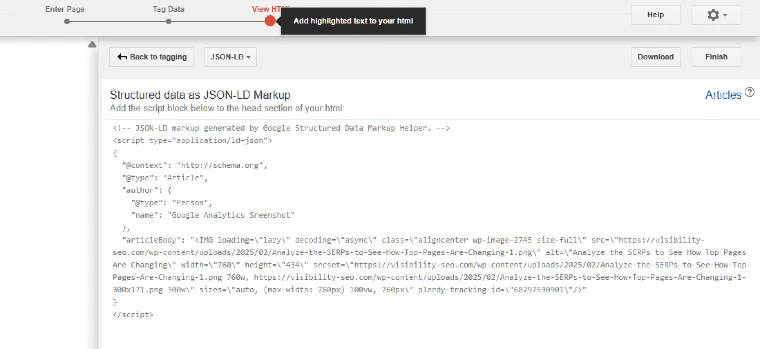
Copy the code and add it to the <head> or <body> of your page. If you’re not sure how to add it consult your developer. Once the structured data is added, upload your updated page.
4. Test the Structured Data
Testing is an important step when working with structured data.
Incorrectly formatted or copied structured data can make it hard for Google to understand your page, which can lead to ranking drops or inaccurate snippets in search results.
Luckily, there are tools to help. Google Structured Data Testing Tool makes it easy to test your schema markup:
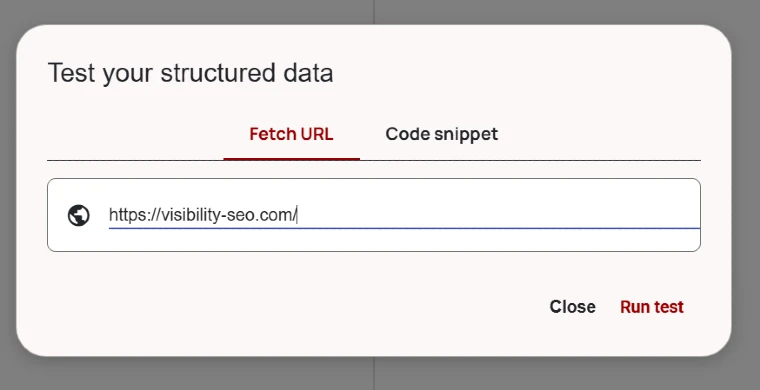
- Open the Structured Data Testing Tool.
- Enter your page URL or structured data code snippet.
- Click “Run Test.”
The tool will show a side-by-side view of your page.
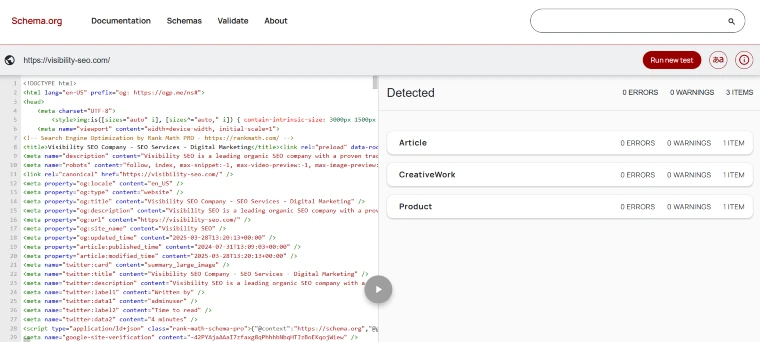
On the left, you’ll see your HTML or code snippet. On the right, you’ll see a list of any errors, warnings, and detected structured data types, such as recipes or products.
You can preview how each piece of structured data will appear in search results.
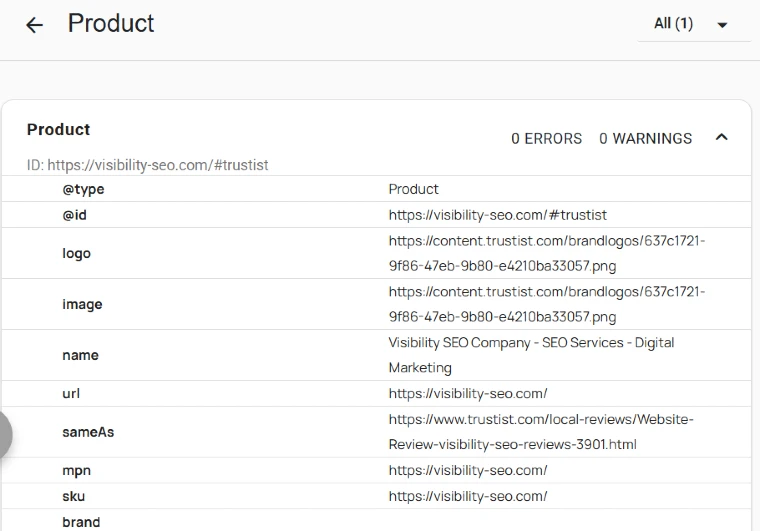
Focus on fixing the errors. If you find issues use the Structured Data Markup Helper Tool to update. Schema.org is another resource to review and correct your markup. It includes a wide range of schema types including those supported by Google.
After you’ve made changes test your structured data again. If errors persist contact your developer for help. Repeat until your structured data is error free.
5. Monitor the Health of the Markup
To ensure the structured data markup is working and accurate you need to regularly monitor its health. Keep an eye on any errors or issues that arise and address them promptly.
The Structured Data Markup Helper Tool can help you identify and fix errors, Schema.org has a wide range of schema types supported by Google. Test your structured data again after making any changes, and contact your developer if errors persist.
Repeat this process until your structured data is error-free and working optimally.
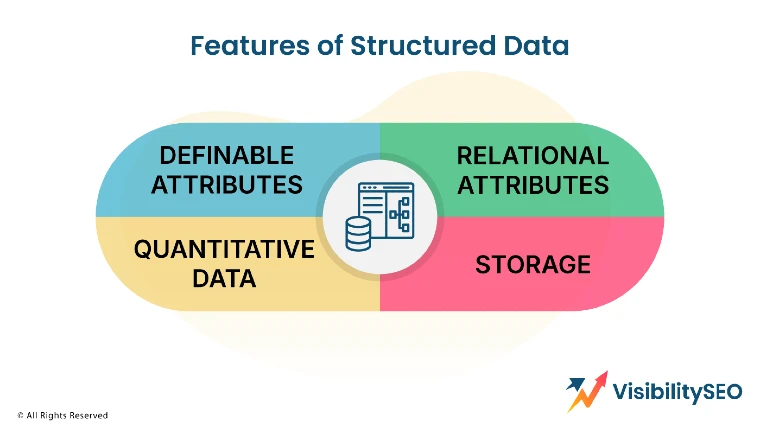
What are the Features of Structured Data?
Here are examples and key features of structured data.
Definable attributes
Structured data uses the same attributes for all data entries. For example, each booking record might have a booking name, event name, event date, and booking amount.
Relational attributes
Structured data tables use shared values to connect different datasets. For example, customer data can link to booking data through customer ID and booking ID fields. Relational databases are best for storing structured data.

Quantitative data
Structured data is easy to analyze with math. You can measure attribute frequency and do calculations on numerical data.
Storage
Relational databases store structured data and use SQL (structured query language) for management. SQL allows you to set up a schema, which defines rules like fields, formats, and values for your data.
Structured data can then be stored in data warehouses or other relational database systems.
Examples of Structured Data
Examples of structured data systems include:
- Reservation systems
- SEO tags
- Product catalogs
- SQL databases
- Point-of-sale records
- Inventory management tools
- Web form submissions
- Excel spreadsheets
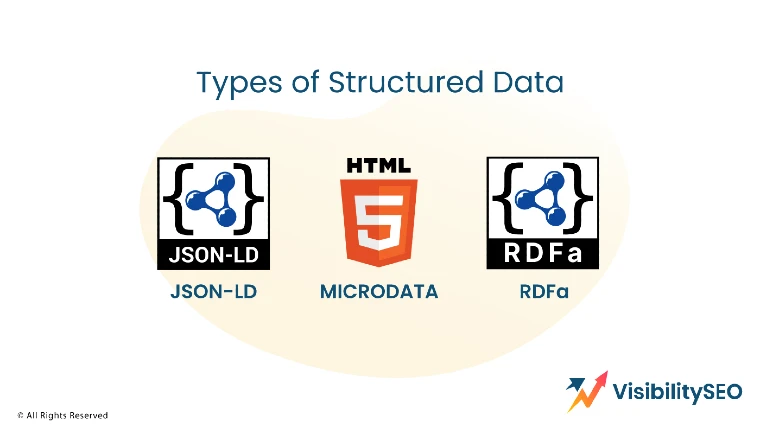
Types of Structured Data
Structured data helps websites share information with search engines. Formats like JSON-LD, Microdata, and RDFa are often used.
These tools are great for explaining technical products like industrial kitchen equipment and showing detailed information in search results.
JSON-LD
JSON-LD (JavaScript Object Notation for Linked Data) is a JavaScript notation placed in a <script>tag within the <head> or <body> of an HTML page.
It keeps the markup separate from the visible text, making it easier to represent nested data like the country in the address of a music venue hosting an event.
Google can also understand JSON-LD when it is dynamically added to a page using JavaScript or content management system widgets.
Pros:
- Easy to implement.
- Easy to read and widely used for SEO.
Microdata
Microdata is an HTML specification that adds structured data to web content. Like RDFa, it uses HTML tag attributes to define properties as structured data. It’s mainly placed in the <body> element but can also be in the <head> element.
Pros:
- Integrates with existing HTML structure.
- More control but harder to implement.
RDFa
RDFa is an HTML5 extension that adds tag attributes to describe user-visible content for search engines. It can be used in both the <head> and <body> sections of an HTML page.
Pros:
- Clearly defines relationships between data.
- Allows to share more information.
Common Use Cases of Structured Data
Structured data can help your business in many ways.
Knowledge Graph
When someone searches for a well-known brand or person, Google displays a Knowledge Graph on the right side of the search results.

This information is usually pulled from websites like Wikipedia. You can add your business details to the Knowledge Graph using structured data.
Rich Snippets
This is a common use of structured data. If your website provides organized information that answers a specific question, search engines can display it as an image carousel in search results.
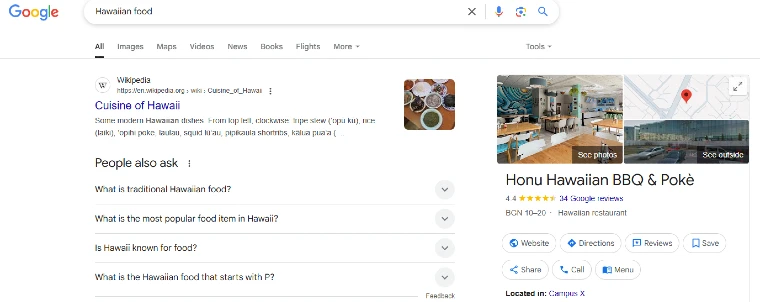
For example, if your site shares Hawaiian food recipes and someone searches for them, Google may use your structured data to feature your content in a carousel at the top of the results page.
Accelerated Mobile Pages
AMPs are HTML versions of web pages designed to load fast on mobile devices.
They improve the mobile search experience and can make your content appear as featured snippets, increasing click-through rates.
If your website uses AMP, adding structured data can make it even better.
Social Cards or Social Previews
Social media is key for business promotion. To make your posts look good, use social markup. It allows you to set the image, title, and description that will appear on social platforms.
Without it, platforms like Facebook, Twitter, or LinkedIn might choose random visuals for your content.
Google Ads
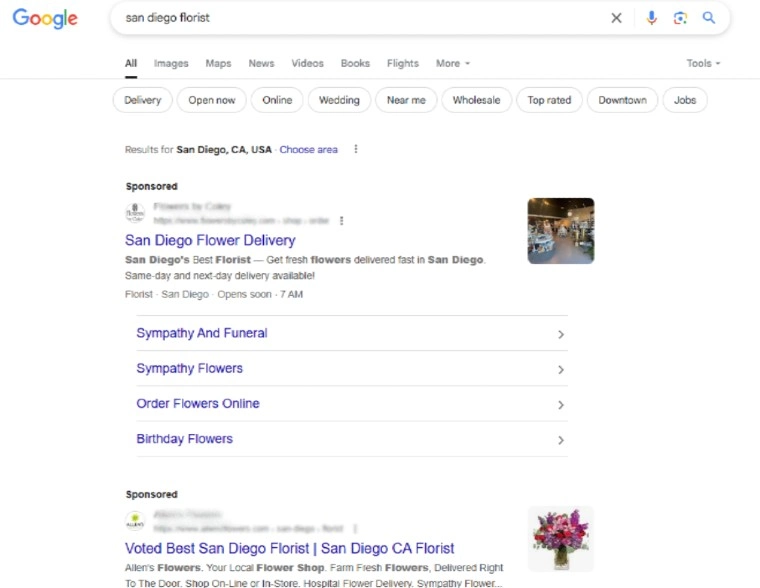
Structured data can be used with structured snippet extensions. This adds extra content to your ad copy, helping users learn more about your business and increase your click-through rate.
What are the Challenges of Structured Data?
Structured data is beneficial for businesses, but it also comes with challenges.
Limited usage
Structured data has limitations. It can only be used for its original purpose. For example, booking data can show financial performance and booking trends.
But it won’t tell you which marketing campaigns drove more bookings unless you link the booking data with campaign data for deeper insights.
Inflexibility
Changing the structure of data is expensive and time-consuming, especially when new relationships or needs arise.
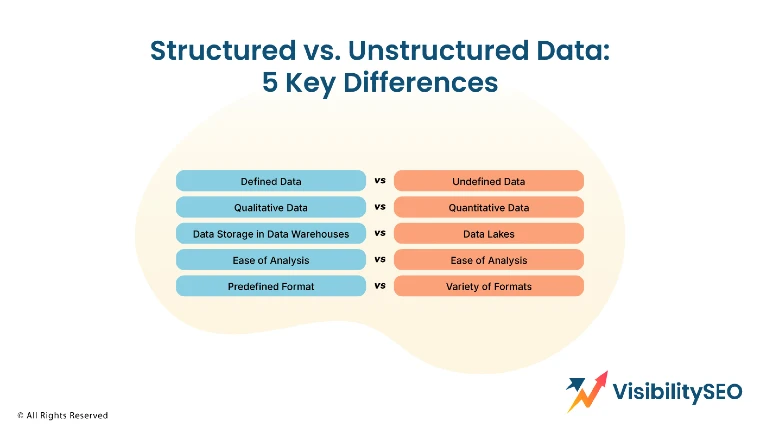
Structured vs Unstructured Data: 5 Key Differences
Here are the five main differences between structured vs. unstructured data:
Defined vs Undefined Data
Structured data is defined data in a structure. Unstructured data is usually stored in its native format, structured data lives in rows and columns and can be mapped into predefined fields.
Structured data can be organized and accessed in relational databases, unstructured data has no predefined data model and is undefined.
Qualitative vs. Quantitative Data
Another difference between structured and unstructured data is that structured data is often quantitative data, meaning it’s usually numbers or things that can be counted. (For example, product info in a customer relationship management system or CRM.)
Methods for data analysis include regression (to predict relationships between variables), classification (to estimate probability), and clustering of data (based on different attributes).
Data scientists and other data analysts can use these methods to get business insights for your company.
Unstructured data is often qualitative data and can’t be processed and analyzed with regular tools and methods.
In a business context, qualitative data can be from customer surveys, interviews and social media interactions.
Extracting insights from qualitative data requires advanced analytics techniques like data mining and data stacking.
Data Storage in Data Warehouses vs Data Lakes
Businesses store structured data in data warehouses and unstructured data in data lakes. A data warehouse is the endpoint of the data’s journey through an ETL pipeline.
A data lake is a kind of almost unlimited repository where you store data in its original format or after a basic “cleaning” process.
Both structured and unstructured data can be in the cloud. Structured data requires less storage, unstructured data requires more.
Structured data is usually stored in a relational database, unstructured data is best in non-relational, or NoSQL, databases.
Ease of Analysis
One of the biggest differences between structured and unstructured data is how well-structured data lends itself to analysis.
Structured data is easy to search for both data analysts and algorithms. Business intelligence tools can easily access and analyze structured data to create reports, dashboards, and visualizations.
Unstructured data is intrinsically more difficult to search and needs to be processed to be understandable. While there are many tools for structured data, most NLP and ML tools for unstructured data are still in beta.
Predefined Format vs. Many Formats
Structured data is usually made up of text and numbers, organized in a set format based on a defined model.
Unstructured data is more varied. It includes things like audio, video, images, emails, and sensor data. There’s no set format—it’s stored as-is, often in a data lake, without needing to be changed first.
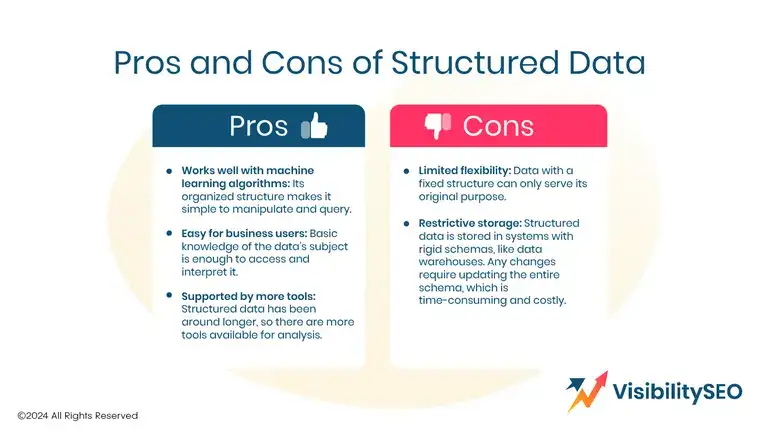
Pros and Cons of Structured Data
Structured data includes items like dates, names, addresses and credit card numbers. It’s easy to use and access but lacks flexibility.
Pros
- Works well with machine learning algorithms: Its organized structure makes it easy to manipulate and query.
- Easy for business users: Basic knowledge of the data’s subject is enough to access and interpret it.
- Supported by more tools: Structured data has been around longer, so there are more tools available for analysis.
Cons
- Limited flexibility: Data with a fixed structure can only serve its original purpose.
- Restrictive storage: Structured data is stored in systems with rigid schemas, like data warehouses. Any changes require updating the entire schema, which is time-consuming and costly.
Structured Data Tools
- OLAP: Analyzes big data fast using centralized, multidimensional data stores.
- SQLite: Self-contained, serverless relational database engine that requires no configuration.
- MySQL: Integrates seamlessly into high-demand production systems and widely deployed software.
- PostgreSQL: Handles SQL and JSON queries and supports programming languages like C/C++, Java, and Python.

Why is Structured Data important for SEO?
Schema markup is an important tool for improving your website’s SEO. Many businesses learn about it when researching ways to rank higher in search results.
With 75% of users staying on the first page of search results, ranking higher is crucial. Here’s how schema markup can help.
Explain your content to Google
Schema markup tells Google exactly what’s on your page. It helps Google understand the format and purpose of your content.
Whether your page is a recipe, event or how-to guide, schema markup provides context that can improve your rankings. This clarity ensures your page is correctly interpreted and displayed in search results.
Increase your visibility in search results
Schema markup won’t put your site at the top of search results, but it can help you stand out. For example, a video with structured data can appear prominently in search results, grabbing user attention.

Similarly, structured data for contact details or products can provide instant helpful information that encourages clicks. Even if Google doesn’t always use your structured data, it’s worth implementing, especially if you have basic developer skills.
Improve user experience
Users want quick answers, and schema markup can provide them. For example, ratings or recipe snippets offer a preview of what your page delivers, helping users decide if it’s worth clicking.
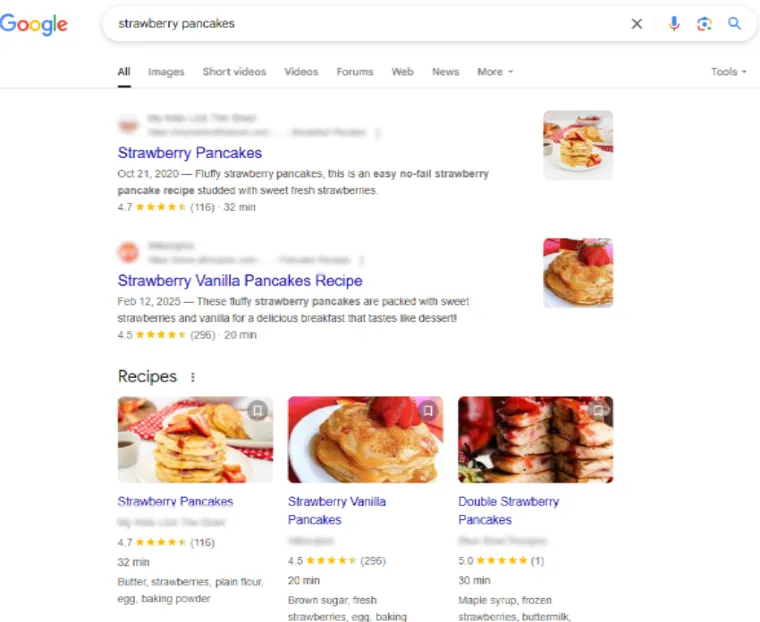
This can build trust and make your site more attractive. Google likes sites that provide clear and useful information, which can positively impact your rankings.
Adding schema markup to your SEO strategy can improve your site’s ranking potential and help users find the information they need faster. It’s a simple step that can make a big difference.
FAQs
Can structured data be converted into unstructured data?
Structured data cannot be converted into unstructured data because they have fundamentally different formats and organization. Structured data is organized in a flat table format, making it easily searchable and analyzable.
Unstructured data, on the other hand, lacks a predefined structure and often includes text, images, audio, and video files.
Converting structured data into unstructured data would involve losing the organized format and hierarchical relationships present in structured data.
Therefore, the two types of data are distinct and serve different purposes in data analytics and data management.
What is the difference between structured and semi-structured data?
Structured data is organized in a flat table format. Semi-structured data includes nested hierarchies. This makes it suitable for handling data from apps, devices and channels.
What are the two sources of structured data?
There are two primary sources of structured data: databases and spreadsheets.
Databases are designed to store structured data in a structured query language (SQL) allowing for efficient storage, retrieval, and analysis.
Databases and spreadsheets (Microsoft Excel or Google Sheets) are the two sources of structured data.

- SEO Consultant vs SEO Agency – What is the Difference? - June 25, 2026
- FAQ Schema: A Simple SEO Trick for Better Visibility - December 20, 2025
- What Is YMYL and Why It Matters for SEO? - December 16, 2025